
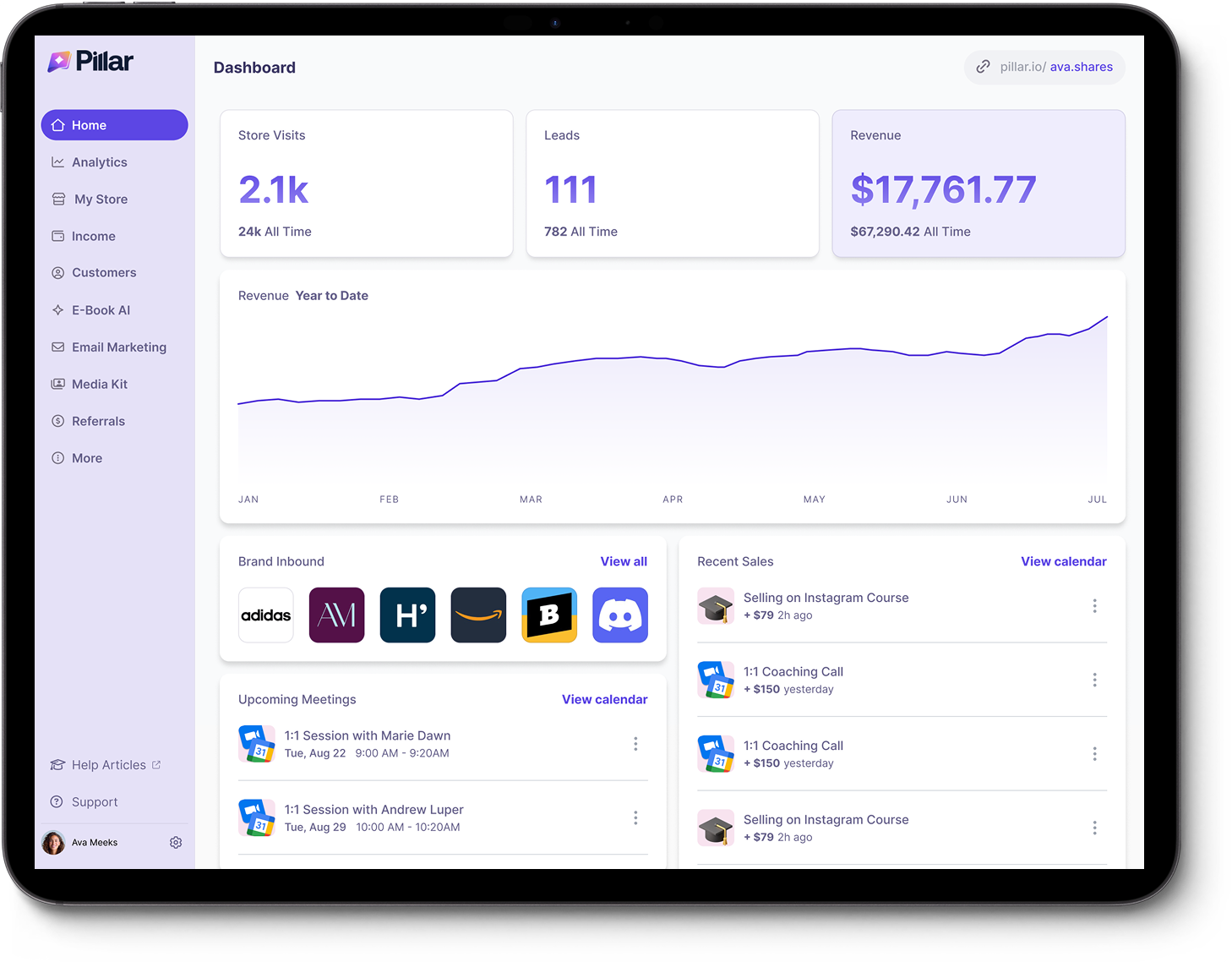
Pillar.io Review 2025 – Is This All-in-One Creator Store Worth Paying For?
If you’re a creator, coach, or talent manager trying to turn followers into customers, you’ve probably bumped into Pillar.io – the “all-in-one creator store” that promises to replace your link-in-bio, checkout, email tools, and even your media kit in one place.
In this review, we’ll break down what Pillar actually does, how its pricing works, where it shines, where it struggles, and whether it’s a better choice than alternatives like Gumroad or The Leap.
Quick Verdict
Pillar.io is best for:
- Creators with multiple revenue streams (digital products + coaching + brand deals)
- Influencers and talent managers who care about media kits and sponsorships
- Creators who want a single platform instead of juggling 5–7 different tools
You might not love Pillar if:
- You’re a beginner on a tight budget (no true free plan – only a 7-day free trial)
- You’re extremely fee-sensitive and want a free tool like The Leap or a no-subscription tool like Gumroad
- You’re anxious about payout issues – a few recent reviews mention delayed or frozen payouts and slow support
If you want a polished, mobile-first storefront and you’re okay paying a monthly fee in exchange for all-in-one convenience, Pillar can be very attractive. If you just want “something cheap that works”, there are simpler options.
What Is Pillar.io?
Pillar is a creator-focused commerce platform that bundles your:
- Link-in-bio store
- Digital product hosting (courses, downloads, memberships, coaching)
- Calendar bookings & appointments
- Email marketing & funnels
- Media kit & brand deal tracking
into a single platform.
On its homepage, Pillar describes itself as “your digital business on autopilot” and claims that over 100,000+ creators and coaches run their businesses on the platform, with more than 1B+ followers and $10M+ earned through Pillar stores.
Unlike simple link-in-bio tools, Pillar explicitly targets professional creators and talent managers – think UGC creators, fitness coaches, beauty influencers, and agencies managing multiple talents.
Pillar.io Key Features (And Why They Matter)
1. Creator Store & Link-in-Bio
At its core, Pillar gives you a mobile-first storefront that lives behind one link (usually in your Instagram or TikTok bio). From that single link you can:
- List digital products (e-books, guides, templates)
- Sell courses and program access
- Offer subscriptions or memberships
- Sell 1:1 or group coaching and other services
- Take custom requests and bookings
The checkout is optimized for mobile and supports 1-tap payments with Apple Pay / Google Pay, and connects via Stripe and PayPal.
The big promise: less friction, more conversions – Pillar claims buyers can stay in your link-in-bio flow with a fast checkout, rather than being sent to slow external pages that often kill the sale.
2. Digital Products, Courses & Memberships
You can host and sell:
- E-books, PDFs, templates
- Online courses
- Bundles and “digital kits”
- Memberships and recurring subscriptions
- Exclusive content or “members-only” offers
One important limitation: Pillar doesn’t (yet) have a built-in digital product builder like The Leap does – you still create your assets in tools like Canva, Notion, Google Docs, etc., then upload them to Pillar.
3. Live Media Kit & Brand Deals
This is where Pillar really stands out from classic “sell your PDF” tools.
Pillar offers a live, auto-updating media kit you can share with brands. It pulls your stats and presents them in a clean, always up-to-date page instead of the typical static PDF deck you constantly have to rebuild.
On top of that, Pillar gives you:
- Campaign reports for brand deals
- A basic creator CRM to keep track of sponsors and contacts
- A way for brands to reach out directly from your link-in-bio
That combination – fan revenue + brand revenue – is a big part of their positioning. Pillar explicitly markets itself as a “Shopify for creators” that helps with both sides of the business.
4. Landing Pages, Funnels & Email Marketing
Pillar includes a drag-and-drop page and funnel builder for:
- Sales pages / landing pages
- Opt-in pages for lead magnets
- Thank-you / upsell / downsell pages
Plus, you get email marketing tools:
- Lead capture forms
- Email sequences to nurture subscribers
- Broadcast emails
- Simple automations that trigger based on purchases or sign-ups
In higher-tier plans, the email marketing is unlimited (no sending limits), which can replace a standalone email tool like ConvertKit if your needs are basic-to-intermediate.
5. AI Tools (Builder, eBook Generator, Infographic AI)
Pillar leans heavily on AI:
- AI Builder – helps you build storefronts, landing pages, and product layouts faster (suggesting sections, copy and structure).
- AI E-book Generator – generates a first draft of your digital product content on the Entrepreneur plan and up.
- Infographic AI – creates visual content like infographics from your information.
On the very top Professional tier you even get an “AI Cortex trained on your content” and the ability to build custom AI products around your brand.
6. Automations, Calendar & “Business on Autopilot”
Pillar also tries to replace tools such as Calendly, Acuity, or standalone funnel builders:
- Calendar bookings with real-time availability
- Automated sales funnels (lead magnets → sequences → offers)
- Automated follow-ups for leads and customers
- Analytics dashboards to see top products, conversion rates, and key customers
The pitch: stop “admin hell” (updating multiple tools, chasing invoices, manually sending links) and let Pillar handle that while you focus on content.
Pillar.io Pricing & Fees
Pillar has three main paid tiers, each available monthly or annually. On the annual billing, current pricing is:
-
Creator – $22/month (billed annually)Entry Plan
- Link-in-bio store
- Media kit (with monthly refresh)
- Digital products, bookings, course builder
-
Entrepreneur – $79/month (billed annually)0% Fees
- Everything in Creator
- 0% platform fees (no Pillar cut on top of payment processor fees)
- Weekly media kit refresh
- Unlimited email marketing
- AI e-book generator & brand message auto-responder
-
Professional – $199/month (billed annually)Advanced
- Everything in Entrepreneur
- AI Cortex trained on your content
- Personal mobile app
- VIP community + 1-on-1 blueprint from a “$40M CEO”
- Custom AI products
There’s also a 7-day free trial, no setup fees, and you can cancel anytime.
On monthly billing, prices are higher (e.g. Creator at $29/month and Entrepreneur at $99/month), and early reports indicate the entry Creator tier may come with transaction fees unless you pay annually.
How this compares
- The Leap – full-featured creator store with an AI product builder and link-in-bio, available on a free plan; you mainly pay standard Stripe fees on sales.
- Gumroad – no monthly subscription, but charges around 10% + a small fixed fee per transaction, plus processing fees. You only pay when you sell.
So Pillar is very much in the “premium, subscription-first” camp. It’s designed for creators who are serious enough to invest in their stack, not for those testing the waters with their first e-book.
What Do Real Users Say About Pillar?
Public reviews are still relatively limited but give a mixed picture:
- Many users really like the UX and the “all-in-one” feel.
- But there are serious concerns from a small number of users around payouts and support responsiveness that you shouldn’t ignore.
If you decide to use Pillar, it’s wise to:
- Start with the free trial.
- Run small volume or low-risk products at first.
- Make sure you’re comfortable with how payouts work (especially if you rely on PayPal).
Pillar.io Pros & Cons
Pros
- True all-in-one tool – storefront, landing pages, email, media kit, CRM, and bookings in one platform.
- Creator-specific focus – built for social-first creators and talent managers, instead of generic e-commerce.
- Media kit & brand features – excellent if you do sponsorships / UGC / influencer marketing, not just product sales.
- Mobile-optimized, 1-tap checkout – good fit for TikTok and Instagram traffic.
- Strong automation options – funnels, email sequences, calendar automation, and AI-assisted setup.
- 0% platform fee on higher tier – Entrepreneur and above remove platform transaction fees (you still pay Stripe/PayPal, of course).
Cons
- No true forever-free plan – only a 7-day trial, after that you’re on a subscription.
- Pricey for beginners – $22–79/month (annual) is a lot if you’re just launching your first product.
- No built-in product builder – you still need tools like Canva or Notion to create your actual products.
- Mixed trust signals – some creators report delayed payouts and poor communication, especially around PayPal payouts, while others are very positive.
- Learning curve – because it tries to replace many tools, it can feel like a lot to configure at first (funnels, email, media kit, products, etc.).
Who Is Pillar.io Best For?
Pillar makes the most sense if you:
- Already have some traction (audience + existing offers).
- Want to consolidate multiple tools (Linktree + Gumroad + Calendly + email tool + manual media kit).
- Actively work with brands and agencies or plan to.
- Care about branding and having a clean, high-converting mobile experience.
Great fits:
- UGC creators & influencers who sell both UGC packages and digital offers.
- Coaches & consultants with a mix of 1:1, group programs, and digital assets.
- Agencies / talent managers handling multiple creators under one roof.
Not ideal for:
- Hobbyists just testing the waters with a first small product.
- Creators whose main priority is “as cheap as possible”.
- People who want maximum control over every part of their stack (and prefer specialized tools).
Pillar vs. Popular Alternatives (Very Brief)
You’ll almost certainly compare Pillar to at least one of these:
- The Leap – free plan with link-in-bio, AI product builder, email, and checkout. Great if you want zero monthly fee and don’t need advanced media kit / brand deal tools.
- Gumroad – no monthly subscription, but takes around 10% fee + processing per sale; simple and battle-tested, but not an all-in-one business OS.
You can think of it like this:
Final Thoughts: Should You Use Pillar.io?
Pillar.io is an ambitious platform: it doesn’t just want to be your storefront, it wants to be your entire creator back-office – from funnels and checkout to brand deals and AI products.
That ambition comes with real advantages (fewer tools, tighter integration, creator-specific features) and real trade-offs (subscription cost, complexity, and some worrying reports around payouts and support).
If you already have a growing creator business, are comfortable paying a monthly subscription, and see yourself making money from both digital products and brand deals, Pillar can absolutely be worth testing – especially starting on the Entrepreneur plan where you get 0% platform fees and serious automation power.
If you’re a beginner or very fee-sensitive, you’re probably better off starting with a free or transaction-only platform like The Leap or Gumroad and switching to something like Pillar once your revenue justifies the upgrade.