
Brutally Honest Skool Review 2026: Pros, Cons, and Is It Worth It?
If you’re trying to sell a course and build a real community (without drowning in tech), Skool is probably on your radar. This is my updated 2026 review with a practical demo, real pricing math, and the parts Skool still gets wrong.
Why another Skool review? Because Skool changed in the last year: new plan options, built‑in video uploads, and a much clearer payment stack. I’m basing the “hard facts” here on Skool’s own docs and Help Center, then adding the human part: what it’s actually like to run a community day‑to‑day.
Quick verdict
My overall rating
Best when you want a focused, “one login” space for community + courses + events, and you’re okay with limited design customization.
The one‑sentence summary
Skool is a deliberately minimal community platform with strong gamification and now native video uploads—great for engagement, less great if you need deep branding, funnels, or enterprise analytics.
Who I’d recommend it to
What Skool does exceptionally well
It makes engagement “automatic” via points, levels and leaderboards—and combines that with courses, events, and payments in one place (so you spend less time duct‑taping tools together).
Where Skool still feels limiting
Branding is intentionally basic, you don’t get a white‑labeled mobile app, and if you rely on advanced marketing (funnels, email automation, complex segmentation), you’ll still need external tools.
The “surprise cost” most people miss
Skool is priced per community/group. If you want multiple separate communities, you pay multiple subscriptions. Also, payments go through Skool Payments (fees explained below), so your margin math matters.
Want to try Skool without overthinking it?
Use my link to start the 14‑day free trial (affiliate). It supports this blog at no extra cost to you.
Skool at a glance
| Product | Skool — community + courses + events + payments |
|---|---|
| Best for | Creators who want a clean community hub that actually gets members participating (not lurking). |
| Not ideal for | Brands that need full design control, white‑label apps, or an all‑in‑one marketing suite. |
| Platform pricing (2026) | Two creator plans: Hobby ($9/mo) and Pro ($99/mo) (plus transaction fees). See the full breakdown below. |
| Payments | Skool Payments handles checkout, receipts, and tax/VAT collection; payouts are sent to your bank weekly (details below). |
| Mobile apps | Official iOS and Android apps with community, courses, calendar, and chat. |
My “use it / don’t use it” rule
If your business depends on member interaction (accountability, feedback, coaching, challenges), Skool is a strong fit. If your business depends on a beautiful branded portal, Skool may annoy you.
What changed the most recently
The two big shifts: native video uploads (with auto captions in English) and more flexible pricing models inside a group (freemium, tiers, trials).
What’s new in 2026 (and why older reviews are outdated)
A lot of Skool reviews floating around were written when Skool had one creator plan and no native video hosting. If you only read those, you’ll walk away with the wrong mental model.
✅ New: native video uploads
You can upload videos directly to Skool (courses and posts). Skool also auto‑generates English captions, and you can add chapters. This removes the “you must use YouTube/Vimeo/Loom” requirement from older tutorials.
✅ New: more flexible member pricing
Groups can run monthly/annual subscriptions, freemium (free + paid inside one community), and tiered plans. For many creators this is the difference between “simple community” and “real membership business.”
✅ New: clearer payment stack
Skool Payments now has a very transparent fee model (Hobby vs Pro) and clear payout timing. If you sell, this matters more than any interface feature.
⚠️ Still true: Skool stays minimal
Skool is not turning into a website builder or a marketing automation suite. It’s still optimized for participation, not pixel‑perfect branding.
My recommendation: If you’re comparing platforms, always check the date of any review you’re reading. In this category, a 12‑month‑old post can be “historical fiction.”
What Skool is in 2026
Skool is an online platform that combines four things that normally live in separate tools: a community feed, a course area, events, and payments. The promise is simple: fewer tools, fewer logins, and fewer reasons for members to disappear.
The design philosophy is also simple (sometimes painfully so): Skool prioritizes participation over customization. That’s why it feels more like “the Apple of communities” than a blank canvas website builder.
Who built it (and why that matters)
Skool states it was founded in 2019 by Sam Ovens (CEO) and Daniel Kang (CTO), and later partnered with Alex Hormozi in 2024 to create The Skool Games. Skool also mentions it’s a ~30‑person team based in Los Angeles.
Platform walkthrough: the Skool interface
Skool’s interface is intentionally lightweight. When you open a group, you’ll typically see these main areas: Community, Classroom, Calendar, Members, and Leaderboards. You can run a surprisingly complete membership business with just those tabs.
1) The Classroom (courses) is where your “offer” becomes structured
The Classroom is built around folders/modules and pages/lessons. What I like is that Skool keeps the course area close to the community—so lessons and discussion don’t feel like two different products.

2) Video uploads are now native
This is a big 2026 update: you can upload videos directly into Skool (both inside the Classroom and in community posts). Skool also generates English closed captions automatically and lets you add chapters—useful for long lessons.


3) Community posts feel like a focused Facebook Group (without Facebook)
Posting is simple: write text, attach files, add images, or share video. Comments are threaded enough for real conversation, and direct messages are built in. This is where Skool shines: the “default mode” is discussion, not consumption.

4) Calendar events keep the community “alive”
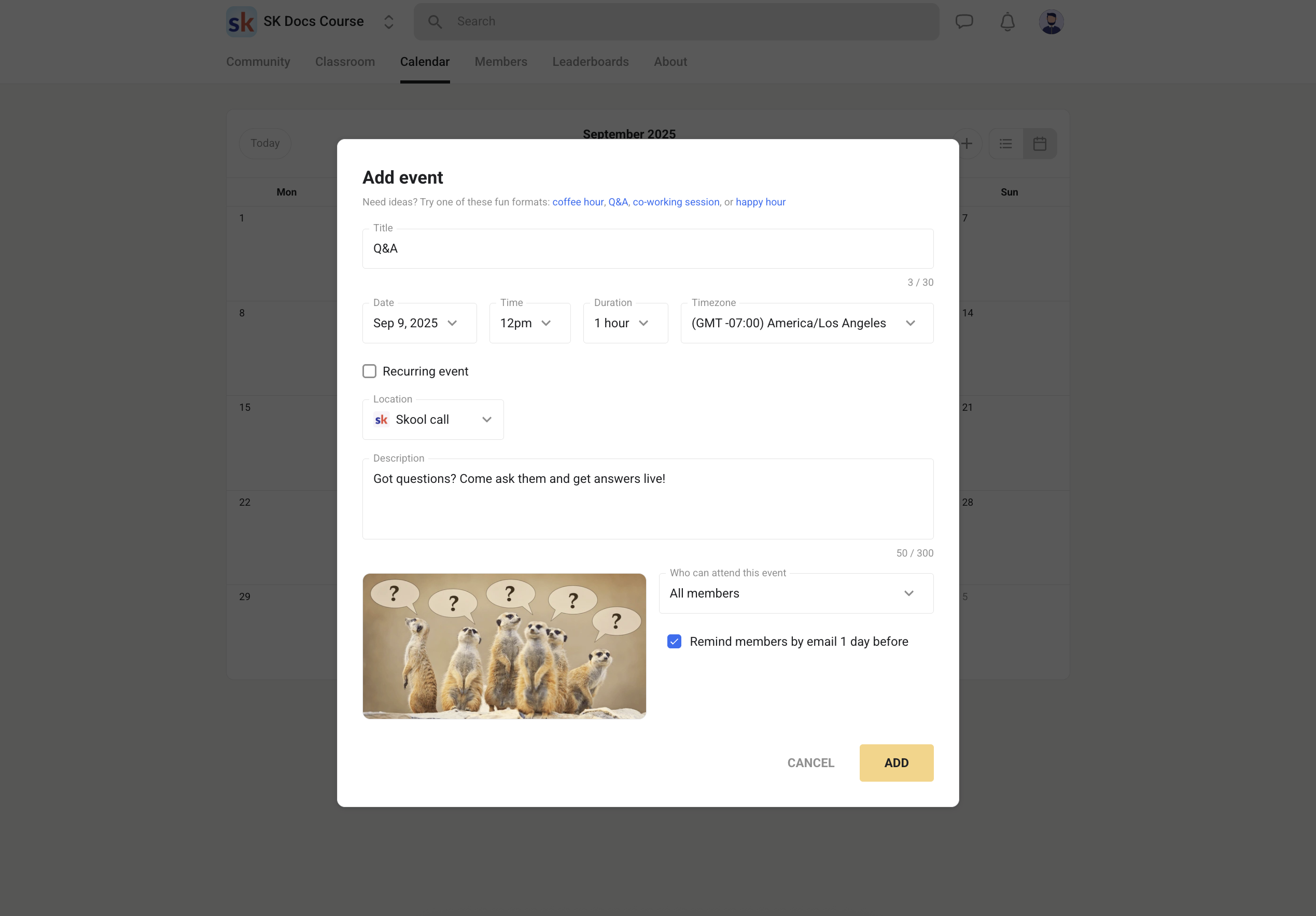
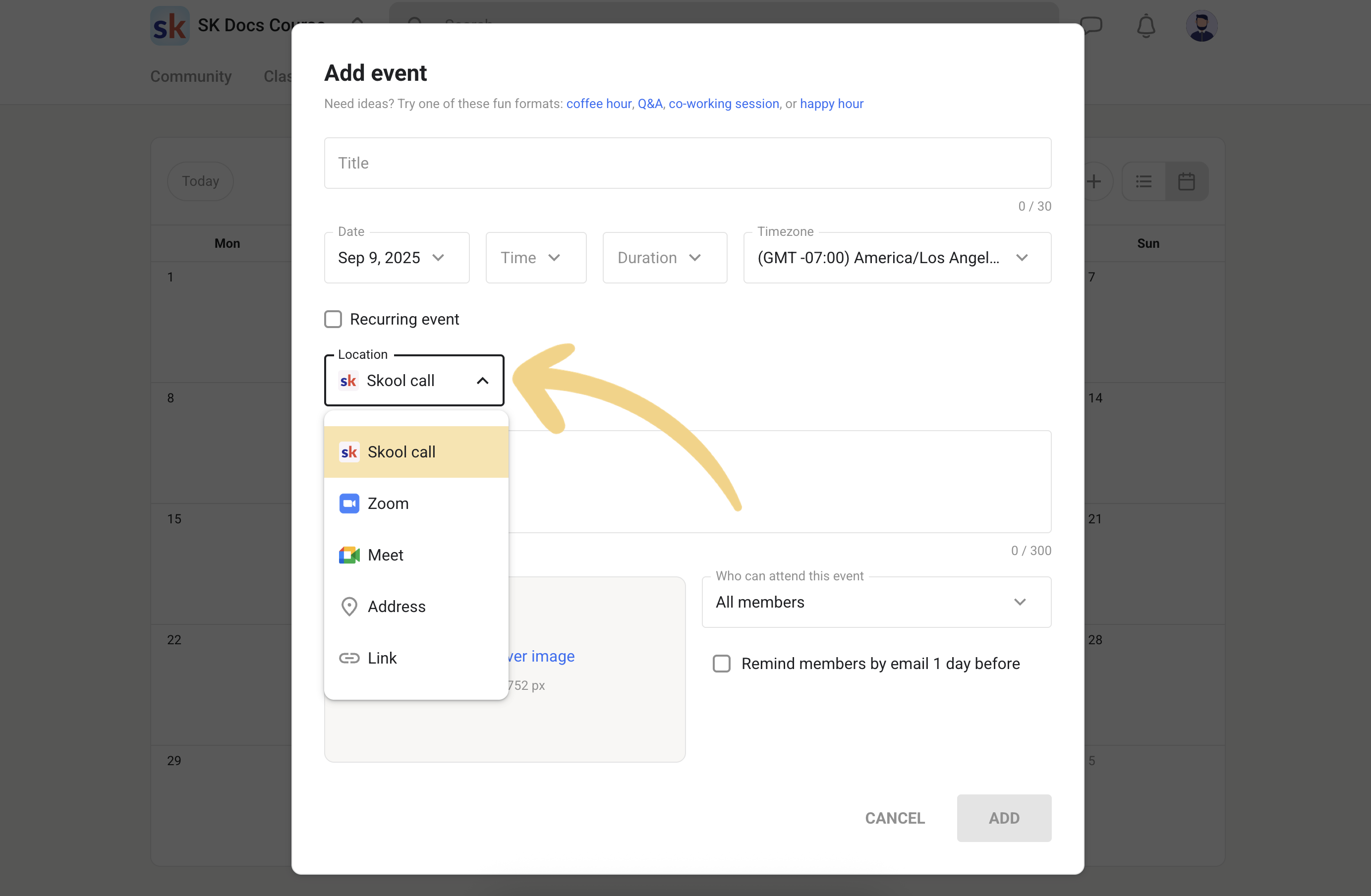
If you run office hours, weekly coaching calls, webinars, or live challenges, Calendar is what makes Skool feel like an active program. Events can repeat, include a cover image, and point to Zoom/Meet links (or Skool’s own live options, depending on your setup).
30‑minute setup checklist (my “launch without chaos” workflow)
Most Skool communities fail for one of two reasons: (1) the owner overbuilds, or (2) the owner never builds the “habit loop.” This is a simple checklist you can follow to get a community live fast—while still making it feel professional.
Step 1: the “storefront” (5 minutes)
- Name + promise: make it obvious who the community is for and what outcome they can expect.
- Cover image + logo: keep it clean; high‑contrast text works better than fancy art.
- About page: include the transformation, the cadence (weekly call? daily prompts?), and what happens after joining.
Step 2: the navigation (5 minutes)
- Create 4–6 categories: Announcements, Start Here, Q&A, Wins, Feedback, Resources.
- Write 3 rules max. Too many rules = nobody reads them.
- Pin a “Start Here” post in Announcements with links to the first lesson and the next event.
Step 3: the first course (10 minutes)
- Create a mini course with 3 lessons: Orientation, Quick win, Next steps.
- Keep videos short (5–10 minutes). Your goal is momentum, not information overload.
- Add a single downloadable resource in lesson 2 (a worksheet, checklist, template).
Step 4: the “habit loop” (10 minutes)
- Schedule 1 recurring event weekly (office hours or coaching call).
- Create a weekly prompt: “Post your win” or “Share your blocker.”
- Set a simple level reward: unlock a resource or bonus at Level 2–3.
If you do only one thing…
Make sure members attend one live event in their first week. That single behavior correlates with retention more than any course completion metric. If you’re running Skool like a “Netflix library,” you’re leaving money on the table.
Community features
Skool communities tend to feel more “task‑oriented” than traditional social groups. That’s mainly because the platform rewards activity with points and levels, and surfaces the most engaged members on leaderboards.
Inviting members (and onboarding without chaos)
You can invite members via a link, email, CSV import, or automation (e.g., Zapier). For larger communities, CSV + automations are the difference between “smooth onboarding” and “support inbox nightmare.”

Categories (keep discussions searchable)
Categories make your community navigable. Instead of one endless feed, you can create sections like “Announcements,” “Wins,” “Q&A,” “Templates,” “Feedback,” or “Job Board.” Skool currently allows up to 10 categories per group, so you’ll want to design them carefully.
Gamification: points, levels, leaderboards
Skool’s gamification isn’t a gimmick—it changes member behavior. People are more likely to introduce themselves, comment, and ask questions because there’s visible progress. You can also lock certain courses/events behind a level, which turns “participation” into a gateway for access.


Practical use: “Level‑gated” onboarding
A simple setup that works: lock your best templates or advanced lessons behind Level 2–3, then reward members who introduce themselves and participate in the first week. It’s not about gamifying for fun—it’s about nudging the behaviors that create community value.
Downside: gamification can be abused
Any points system attracts “points farmers.” Skool explicitly warns that mindless engagement and points farming can get a group delisted from Discovery—so design prompts and rewards that encourage meaningful participation.
Roles & moderation (how to keep quality high)
Skool’s moderation tools are intentionally simple: you’re not running a complex forum with dozens of sub‑roles. That said, you can still run a high‑quality community if you set expectations early:
- Write rules like “culture statements” (what you do here, what you don’t do here).
- Use one announcement category where only admins can post.
- Make “quality the default” by modeling the kind of posts you want members to write.
Courses (Classroom): how good is Skool as a course platform?
Skool’s Classroom is not trying to be a full LMS like Teachable or Kajabi. Instead, it’s a “good enough” course area integrated into a community. That’s exactly why it works: the course is where members learn, but the community is where they stay.
Course building workflow
- Create a course (title, description, cover).
- Add folders (modules) and pages (lessons).
- Attach video + text + resources per lesson.
- Decide access: all members, tier‑based access, level‑based unlocks, drip release, or paid unlocks.
Video options (upload or embed)
Skool supports direct video uploads, and you can still embed from platforms like YouTube if that’s your workflow. For many creators, native uploads remove an entire subscription (and a whole category of “my video link broke” support tickets).

Built‑in discussion per lesson
One of Skool’s best “learning design” ideas: lessons naturally lead into discussion because the community is a single click away. If you run cohort programs, this matters more than fancy course player features.
My favorite Skool course use-case
A “spine course” (core curriculum) plus weekly live calls plus a Q&A feed. The course gives structure; the calls create accountability; the feed keeps momentum between calls.
Events & live sessions (Calendar)
Skool’s Calendar is deceptively powerful. It turns your community from “content library” into “ongoing experience.” That’s the difference between a membership that feels alive and one that gets cancelled after month one.
What you can schedule
- Weekly coaching calls / office hours
- Webinars or training sessions
- Challenges and accountability sessions
- Guest expert sessions
- In‑person meetups (yes, Skool supports offline events too)
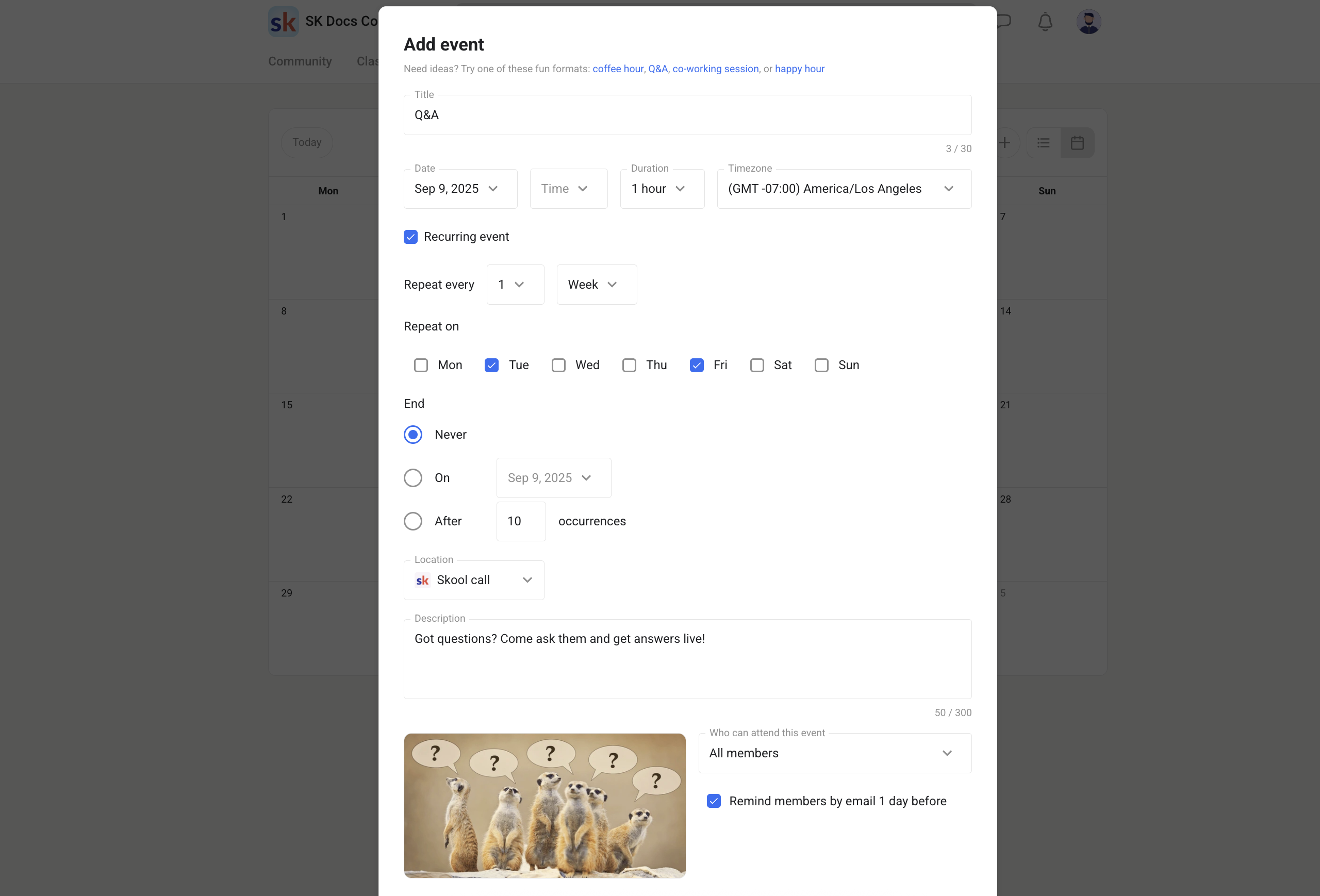
Recurring events (set it once)
Recurring events are the secret to reducing admin work. The more “automatic” your calendar is, the more consistent your community becomes.
Pro tip: tie events to onboarding
If new members don’t attend something live in the first 7 days, they’re far more likely to become passive lurkers. Add a “New Member Orientation” event weekly and pin the replay inside the Classroom.
Customization & branding (what you can and can’t change)
Skool’s customization is intentionally limited. This is both the platform’s strength and its weakness. It’s a strength because you can’t “overdesign” your community into confusion. It’s a weakness because brands that care deeply about visuals will feel constrained.

What you can customize
- Group name, logo, cover image, and descriptions.
- About page content and media (this matters a lot for Discovery).
- Categories and posting permissions per category.
- Pricing structure (free, paid, tiers, freemium).
- Custom URL (Pro plan).
What you can’t customize (without leaving Skool)
- Full theme control (fonts, layout variations, advanced components).
- A fully branded mobile app (members use the Skool app).
- A custom landing page/funnel builder like you’d get in a marketing platform.
Workaround that keeps everything clean
Use your website (or a simple landing page) for marketing and SEO, then send members into Skool for delivery. Skool is excellent as the “member area.” It’s not trying to be your public website.
Monetization & Skool Payments (the part most reviews gloss over)
Skool’s built‑in payment flow is one of the most meaningful upgrades to the “community + course” category. Why? Because it removes the awkward layers: checkout pages, manual invoicing, VAT headaches, access management, and churn logistics.
Skool Payments in plain English
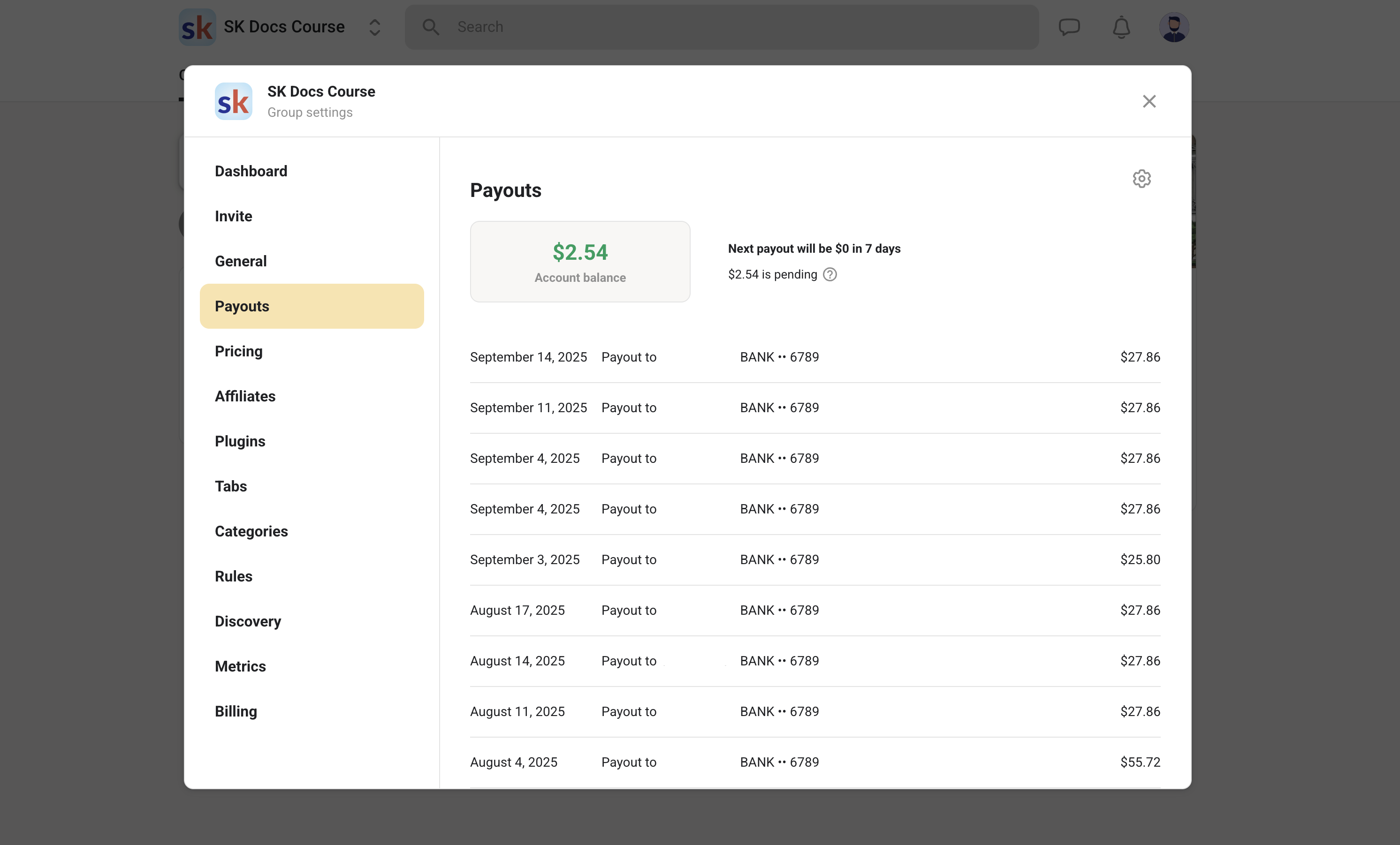
Skool processes payments on its own merchant account and uses a Stripe Express connection to send payouts to your bank account. The benefit is operational: receipts are automatic, members can manage their subscriptions, and Skool handles VAT/sales tax collection where required.
What I like about Skool Payments
Weekly payouts, automatic receipts, tax handling, and built‑in subscription management reduce the annoying “membership admin” work that kills small teams.
What you should watch out for
You are opting into Skool’s payment rails. That’s great for simplicity, but your fee structure and payout timing matter (especially if you sell high‑ticket offers).
Refunds & disputes: you’re still the business owner
Skool’s policy is to let creators set refund expectations; Skool can issue refunds at its discretion, but usually won’t do it “for you.” If a member disputes a payment, you can accept or counter and provide evidence (deliverables, access activity, etc.).
Grandfathering is built in (this is underrated)
If you raise prices later, existing members can stay on their current price (including free members). This makes it easier to run “early adopter” pricing without punishing your first supporters.
Skool pricing, plans & fees (2026)
Skool offers two creator plans for running a community: Hobby ($9/month) and Pro ($99/month). Both plans can run a full community; the big difference is the transaction fee you pay when you charge members or sell access.

| Plan | Monthly price | Transaction fee (Skool Payments) | Best for |
|---|---|---|---|
| Hobby | $9 / month | 10% + $0.30 per transaction | Testing an idea, small communities, or creators who don’t sell much through the platform. |
| Pro | $99 / month | 2.9% + $0.30 per transaction up to $899 (and 3.9% + $0.30 above $900) | Serious memberships, paid communities, and anyone selling at scale who cares about margins. |
Which plan should you choose?
Choose Hobby if…
- You’re validating a niche and want the lowest fixed cost.
- You’re running a free community (or only occasional paid offers).
- You’re okay paying higher fees on the rare transactions you do make.
Choose Pro if…
- You’re charging monthly memberships and want predictable margins.
- You sell higher ticket offers (fees add up fast on Hobby).
- You want Pro‑only admin options like a custom URL (and you want to treat your community as a business asset).
Important fee details (read this if you sell)
- Skool’s transaction limit is currently up to $10,000 per charge.
- Subscription prices are listed in USD, but payouts are sent in your local currency.
- Payouts are sent every Wednesday; the first payout can take up to ~14 days due to checks.
- Skool handles VAT/sales tax compliance for purchases inside Skool (especially relevant for EU members).
Margin math example
If you charge $30/month and have 100 members, that’s $3,000 in monthly recurring revenue (MRR). On Hobby, 10% is $300 (+ per‑transaction cents). On Pro, 2.9% is $87 (+ cents). That difference alone can pay for Pro—before you even think about scaling.
Group pricing options (how you charge your members)
Skool supports multiple pricing models inside a group: monthly/annual subscriptions, one‑time payments, and newer options like freemium (free tier + paid tier) and tiered plans. Some groups also run short free trials for paid plans.
Want to try Skool without overthinking it?
Use my link to start the 14‑day free trial (affiliate). It supports this blog at no extra cost to you.
Analytics & reporting
Skool’s analytics are built for operators, not data scientists. You can track the numbers that matter for a membership: members, MRR, conversion rate from the About page, and more.
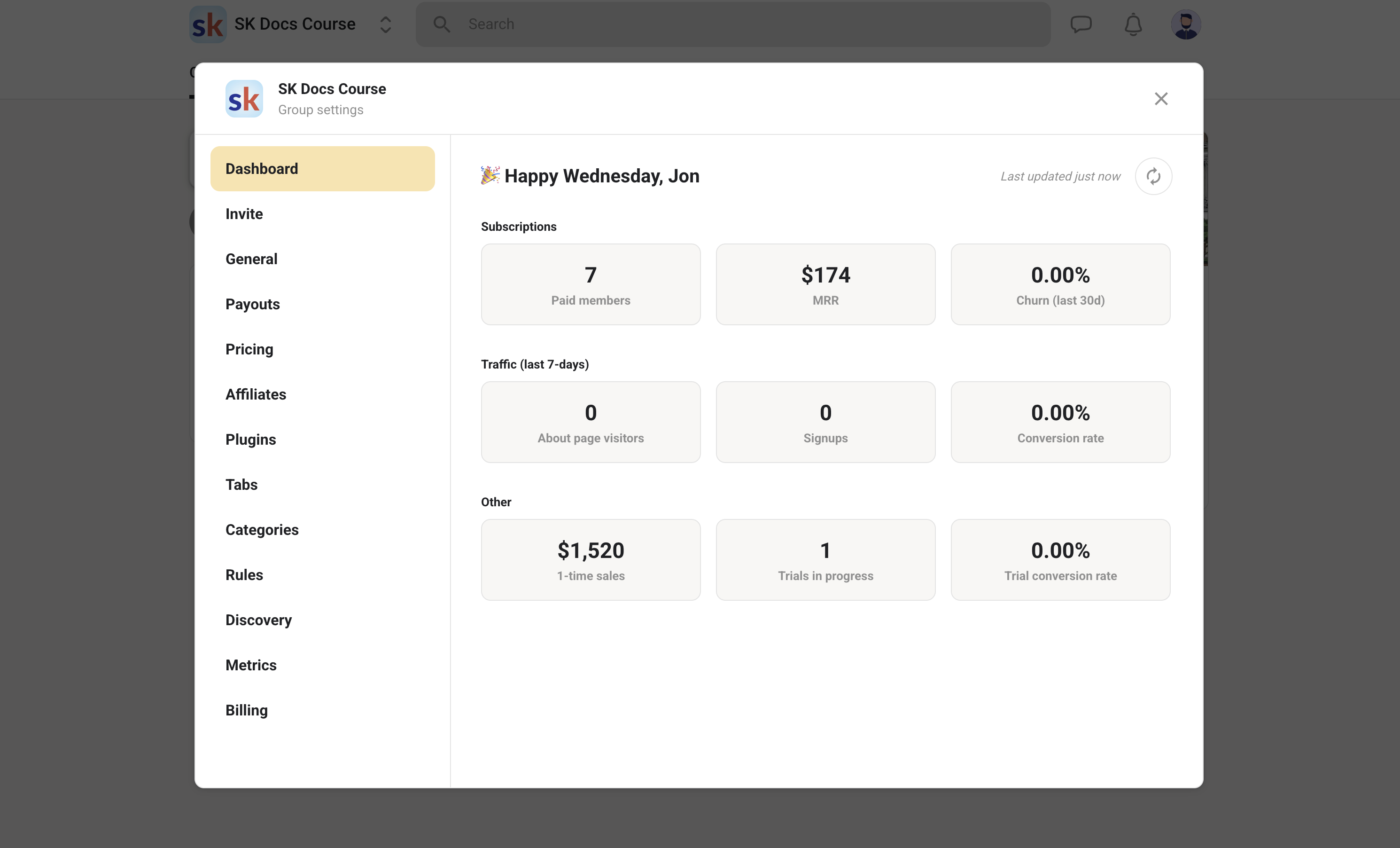
If you need deep cohort retention curves, attribution modeling, or advanced segmentation, you’ll still want external analytics. But for most creators, Skool’s built‑in dashboard covers the “80/20” metrics.
My favorite metric to watch
Conversion rate from the About page is underrated. If you improve that, every traffic source becomes more valuable. Small tweaks—better positioning, a clearer promise, stronger social proof—can create an immediate revenue lift.
Discovery & growth (how people find you inside Skool)
Skool has a built‑in Discovery system. That means your community can be found by people browsing categories or searching for keywords. It’s not a replacement for external marketing, but it can become a meaningful “second channel” over time.
How ranking works (according to Skool)
Skool says groups are ranked per category using an algorithm that looks at: member growth, member activity, and retention. They also warn that mindless engagement and points farming can lead to delisting.
Practical Discovery checklist
Treat your Skool About page like a landing page: strong cover image, clear niche keywords, and a promise that’s easy to understand in 5 seconds. Then focus on retention: live events, onboarding, and weekly “member wins” prompts.
Reality check: Discovery helps, but it won’t save a weak offer. Your group still needs a clear transformation, consistent delivery (calls/content), and a reason for members to show up every week.
The Skool Games (quick explainer)
Even if you don’t care about internet business culture, you’ve probably heard of “The Skool Games.” In short: it’s a Skool community/initiative connected to Alex Hormozi that promotes building and growing communities on Skool, with leaderboards and prizes.
My practical take: you don’t need to participate to benefit from Skool, but the Games explain why Skool has such a loud creator ecosystem. If you like competitive challenges and weekly accountability, it can be motivating. If you don’t, ignore the noise and use the platform your way.
Don’t confuse “Skool platform” with “Skool hustle culture”
Skool can host art groups, fitness cohorts, language communities, and professional training programs. Some niches are noisy because the incentives are obvious (make money with memberships). The platform itself is neutral.
Integrations & automations
Skool is intentionally “not a Zapier playground”… but it still supports the integrations that matter for creators: automating invites, onboarding, and connecting Skool to your existing stack (CRM, email marketing, checkout flows, etc.).

What I’d automate first
- Post‑purchase onboarding: after a purchase, auto‑invite the buyer to Skool and DM them a “Start here” link.
- Member tagging / segmentation: send membership answers to your CRM so you know what your members want.
- Reminders: email/SMS reminders for weekly calls (Skool notifications are helpful, but redundancy wins).
Skool mobile app (2026)
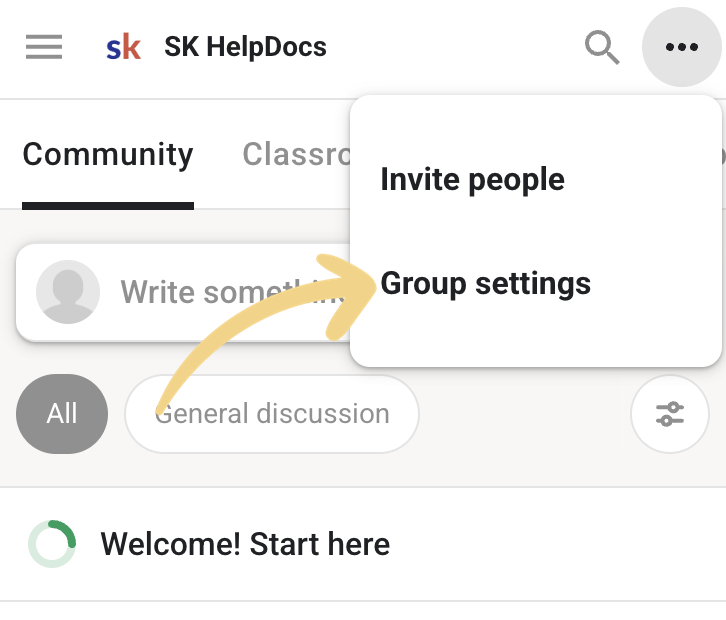
Skool has official apps for iOS and Android, with the same core areas as desktop: community posts, courses, calendar, and chat. In practice, the mobile experience is what keeps members engaged between live sessions.
What members can do in the app
Post and comment, watch lessons, join events, and DM other members—plus receive push notifications.
What you can’t do
You don’t get a white‑labeled branded app; members use the Skool app.
My onboarding tip
On day 1, ask members to install the app and turn on notifications (at least for events/announcements). This single step often doubles week‑one participation.
Support: how help actually works
Skool has a public Help Center with clear docs, and you can reach support via email. In most “how do I do X?” situations, the docs are genuinely enough.
What I still wish Skool offered
A true live chat option for urgent billing issues. Email works, but when you’re running a paid membership, speed matters.
Note for creators: Skool emphasizes that you are responsible for supporting your members (refunds, deliverables, etc.). Skool provides the platform and receipts, but you own the customer experience.
Skool vs Circle vs Kajabi vs Facebook Groups
There isn’t a single “best” platform—there’s only the best fit for your business model. Here’s the most practical way I’d compare them in 2026.
| Platform | Where it wins | Where it loses | Best for |
|---|---|---|---|
| Skool | Engagement (gamification), simplicity, community + courses + events in one place, built‑in payments. | Limited branding and design control; not a full marketing suite. | Creators who want a clean membership hub and high participation. |
| Circle | Customization, flexible community structure, strong branding options. | Can feel more complex; engagement depends more on how you design the community. | Brands that want community + design control (and can handle a bit more setup). |
| Kajabi | All‑in‑one marketing (site, funnels, email) + course delivery. | Higher cost; community is not as “central” as Skool for engagement. | Businesses that want one platform for marketing + courses, and community is secondary. |
| Facebook Groups | Free, familiar, easy to join. | Distractions, algorithm changes, weak course structure, limited monetization & ownership. | Early‑stage communities validating demand (before moving to a paid platform). |
My simple decision framework
If the community itself is your product → Skool or Circle. If marketing automation is your product → Kajabi. If you’re still validating and want “good enough for free” → Facebook Groups.
Migrating from Facebook Groups, Circle, Kajabi, Discord, or Slack
Migration is where many creators panic. The good news: you don’t need a “big bang” move. The best migrations are phased and value‑driven—members follow value, not platforms.
Phase 1: mirror (1–2 weeks)
- Keep your old community open.
- Start posting in both places, but put the best resources (templates, replays) in Skool only.
- Run one event exclusively in Skool and invite members from the old platform.
Phase 2: move the habit loop (weeks 3–6)
- Make Skool the default place for Q&A and replays.
- Pin an announcement in the old community: “All new content is now in Skool.”
- If you charge, keep the paywall only in Skool to avoid access confusion.
Phase 3: clean up (after 60–90 days)
- Archive old groups or lock posting to announcements only.
- Export key resources and store them in Skool Classroom.
- Celebrate the move (members like feeling part of a “new chapter”).
Big migration mistake
Don’t promise “everything will be moved.” Most members don’t want an archive—they want the next step. Move only what supports your onboarding and your core curriculum.
Common mistakes (and how to fix them)
Mistake #1: treating Skool like a content dump
Fix: start with one tiny course and one weekly event. Community is built in the spaces between content.
Mistake #2: too many categories
Fix: create fewer categories and make them outcome‑based (“Wins”, “Feedback”). If members don’t know where to post, they won’t post.
Mistake #3: no onboarding “first win”
Fix: design a first week challenge: introduce yourself, complete lesson 1, attend the call, post your win. Reward Level 2 unlocks.
Mistake #4: ignoring your About page
Fix: rewrite the About page like a sales page. Clear niche keywords, clear promise, clear schedule, clear proof.
Mistake #5: pricing without a promise
Fix: price is easiest when the outcome is clear. If your membership feels like “access,” people churn fast. If it feels like “progress,” people stay.
FAQ
Is Skool worth it in 2026?
If your business needs an engaged community (not just a course library), Skool is still one of the best “engagement‑first” platforms. The value depends on whether you’ll actually use the community + events features rather than just hosting videos.
Does Skool have built‑in video hosting now?
Yes—Skool supports native video uploads and can generate English closed captions automatically. You can also embed external videos if you prefer.
Can I offer multiple pricing tiers in one Skool group?
Yes. Skool supports group pricing models like subscriptions, one‑time payments, freemium setups, and tiered plans. This lets you run “free + premium” inside the same community.
How do payouts work with Skool Payments?
Skool sends payouts to your bank weekly (typically every Wednesday). The first payout can take longer due to checks. Fees depend on your Skool plan (Hobby vs Pro).
Can I white‑label the Skool mobile app?
No. Members use the Skool app. If a fully branded app is essential, consider a platform that offers white‑labeling.
How does Skool Discovery work?
Skool ranks groups within categories based on growth, activity, and retention. Low‑quality engagement or points farming can lead to delisting, so focus on real community value.
Final verdict: should you use Skool?
If you want a platform where community participation is the default—and you want courses and events in the same place—Skool is an easy “yes” in 2026. It’s especially strong for coaches, cohort programs, and creators who want consistent engagement without adding more tools.
Skool is a great fit if…
- You want a membership community that stays active (leaderboards + levels help).
- You want courses + discussions together (not separated across tools).
- You run events or live calls and want a simple calendar experience.
- You want built‑in payments and less admin work (receipts, VAT, subscription management).
- You’re okay with “clean and simple” branding rather than full design control.
You should consider alternatives if…
- You need a fully branded / white‑label experience (including a branded app).
- You need enterprise reporting, advanced permissions, or heavy customization.
- You want an all‑in‑one marketing suite (funnels + email + website built in).
- Your content requires complex LMS features like quizzes/certificates/grading.
- You’re extremely fee‑sensitive and prefer using your own payment processor stack.
My recommendation
Start a 14‑day trial, build a tiny “pilot community” (even with 20–50 members), run one live event, and publish one short course module. If people participate without you constantly chasing them, Skool is working.
Want to use my exact structure? Copy this outline, update the examples to your niche, and swap the links with your own affiliate links (if applicable). Then add screenshots from your own group for maximum originality.
Ready to build your own Skool community?
If Skool matches what you need, the fastest way to validate it is to set up a group and invite a few members during the trial.