
Skool Review (2026): updated pricing, modern monetization (freemium/tiers/one‑time) — but is it the right platform for a growing business?
Skool is still one of the fastest ways to launch a paid community + classroom in one place. But speed is only half the story. This 2026 review breaks down what Skool does brilliantly, where it still feels intentionally “minimal,” and how the new pricing models (freemium, tiers, one‑time group access, and buy‑now courses) change the business equation.
Quick take: Skool is best when you want a clean, distraction-free community with simple courses and strong engagement loops — and you can live with limited branding, shallow automations, and “good enough” LMS functionality.
Affiliate Disclosure
Transparent & simpleThis page contains an affiliate link to Skool. If you join through my link, I may receive a commission at no extra cost to you. I still write these reviews as if I’m choosing the platform for my own business — because bad recommendations always come back to bite.
What Is Skool?
In one line: Community + Classroom + Calendar + LevelsSkool is an all‑in‑one platform built around a simple idea: learning sticks better when people learn together. Instead of running your community in one tool, your course in another, and your events somewhere else, Skool keeps everything under one roof: a discussion feed, a classroom area for courses, a calendar for calls and webinars, and a light gamification system (points + levels).
The platform’s “secret sauce” has always been its deliberate simplicity. You don’t get 500 settings to obsess over. You get a clean experience that’s fast to learn for you and for members. That’s why many creators can launch a paid community in an afternoon — and why members actually use it instead of getting lost.
But simplicity has trade‑offs. As your business grows, you’ll start caring about things like segmentation, advanced learning paths, certification, deep automation, multi‑brand setups, and stronger brand control. Skool is improving — especially on monetization — but it still chooses “minimal” in many places.

What’s New in Skool (2026 Edition)
Biggest upgrade: monetization flexibilityThe biggest shift since the older “Skool is just a subscription community” era is that Skool now supports multiple ways to charge — without forcing weird workarounds. Here’s what matters most for a creator in 2026:
NEWER MODEL
Freemium in one group
Run a free plan + paid upgrade inside the same community — useful for lead generation and smoother conversions.
NEWER MODEL
Tiered pricing
Create 2–3 paid tiers (e.g., Standard / Premium / VIP) and attach benefits to each tier.
NEWER MODEL
One‑time purchases
Offer one‑time group access (lifetime / pop‑up) and sell individual courses via “Buy Now” inside the classroom.

Skool also improved the “delivery experience” in a few practical ways that matter more than they sound:
- Course access options now include time unlock, level unlock, private, and buy‑now.
- Native video hosting supports chapters (timestamps) and auto captions (English), plus speed controls.
- Webinars are available as a native event type (Pro feature), alongside Skool Calls and external tools like Zoom.
- Plugins expanded into a legit toolkit: AutoDM, onboarding video, cancellation video, ad tracking, webhooks, etc.
Skool Feature Overview (2026)
Use this: fast platform checkHere’s the cleanest way to understand Skool: it’s not “everything for everyone.” It’s a tight set of community-first features that work well together — plus a growing monetization layer.
| Category | What you get | Where it feels limited |
|---|---|---|
| User experience | Clean UI, quick navigation, minimal learning curve for members. | Very little design control; brand identity stays “Skool‑ish.” |
| Community | Main feed + categories, basic moderation, member directory, search. | Limited segmentation and advanced channel structures vs more modular community platforms. |
| Courses | Simple course builder (pages + folders), native video, embeds, resources. | No built‑in quizzes, assignments, graded feedback, or native certificates. |
| Course access | Open, level unlock, time unlock, private access, and buy‑now course purchases. | Good for gating, not a full “learning path” engine with branching logic. |
| Gamification | Points and levels based on likes, leaderboards, custom level names. | Rewards only what gets liked; doesn’t natively score course completion or event attendance. |
| Events | Calendar, Skool Calls, webinars (Pro), plus Zoom/Meet options. | Event marketing + attendee workflows are basic (no advanced ticketing automation). |
| Monetization | Free, subscription, freemium, tiers, 1‑time group access, buy‑now courses. | Fees can be a big deal as revenue grows; limited storefront/checkout customization. |
| Plugins | AutoDM, onboarding video, cancellation video, Zapier, Pixels, webhooks, etc. | “Automation” is still mostly plugin-based rather than full workflow logic. |
| Analytics | Dashboard metrics like members, MRR, churn, trials, 1‑time sales. | Not a deep BI suite; advanced cohorts/retention analysis requires exports + other tools. |
Courses & Classroom
Best as: practical knowledge librarySkool’s classroom is built for clarity and speed. You can create a course quickly with modules (folders) and lessons (pages). Members see a clean sidebar for navigation and progress, and your content stays front and center without distractions.
The big 2026 improvement isn’t “a fancy course editor” — it’s that Skool now supports multiple course access mechanics. That means you can build membership incentives without building a complicated tech stack.
ACCESS OPTIONS
Unlock by level or time
Turn engagement into progression: unlock a course at a certain member level, or after X days from joining.
SELLING INSIDE SKOOL
Buy‑Now course purchases
Sell individual courses inside a free or subscription group without forcing everything into a subscription.
Where Skool still falls short for serious education
- No native quizzes or exams (you’ll need external tools).
- No built‑in assignments with feedback loops.
- No native completion certificates.
- Limited learning path complexity (branching, prerequisites, conditional logic).


Video hosting is better than you’d expect
Skool’s native video hosting isn’t just “upload a file.” In practice, it’s built for course delivery: you can add chapter timestamps and members get playback controls like speed and quality. Closed captions (English) can be automatically generated for videos with sound.
This matters because it reduces “tech friction.” Members don’t get bounced out to random video platforms, and your lessons feel like they belong inside the experience.
PRO TIP
Use chapters as “micro‑milestones”
Write your lesson so each chapter ends with a simple action step. It improves retention without quizzes.
PRO TIP
Pair lessons with a pinned thread
Because Skool is community‑first, discussions are the “assignment” substitute. Make it intentional.
Note: Members can also upload videos in posts/comments, which can be great for accountability or quick feedback loops.
Community, Moderation & Anti‑Spam
Skool strength: engagement simplicitySkool communities feel familiar — and that’s a feature. The main feed works like a streamlined social timeline: members post, comment, like, and the most engaging content naturally rises. Categories help you organize topics and keep the feed readable.
If you’re building a small to mid‑sized community where people benefit from being in the same room, this format works extremely well. It’s also one of the reasons Skool communities can feel more “alive” than many forum-style platforms.
Moderation essentials are covered
- Admins/moderators can approve or decline new members and remove reported content.
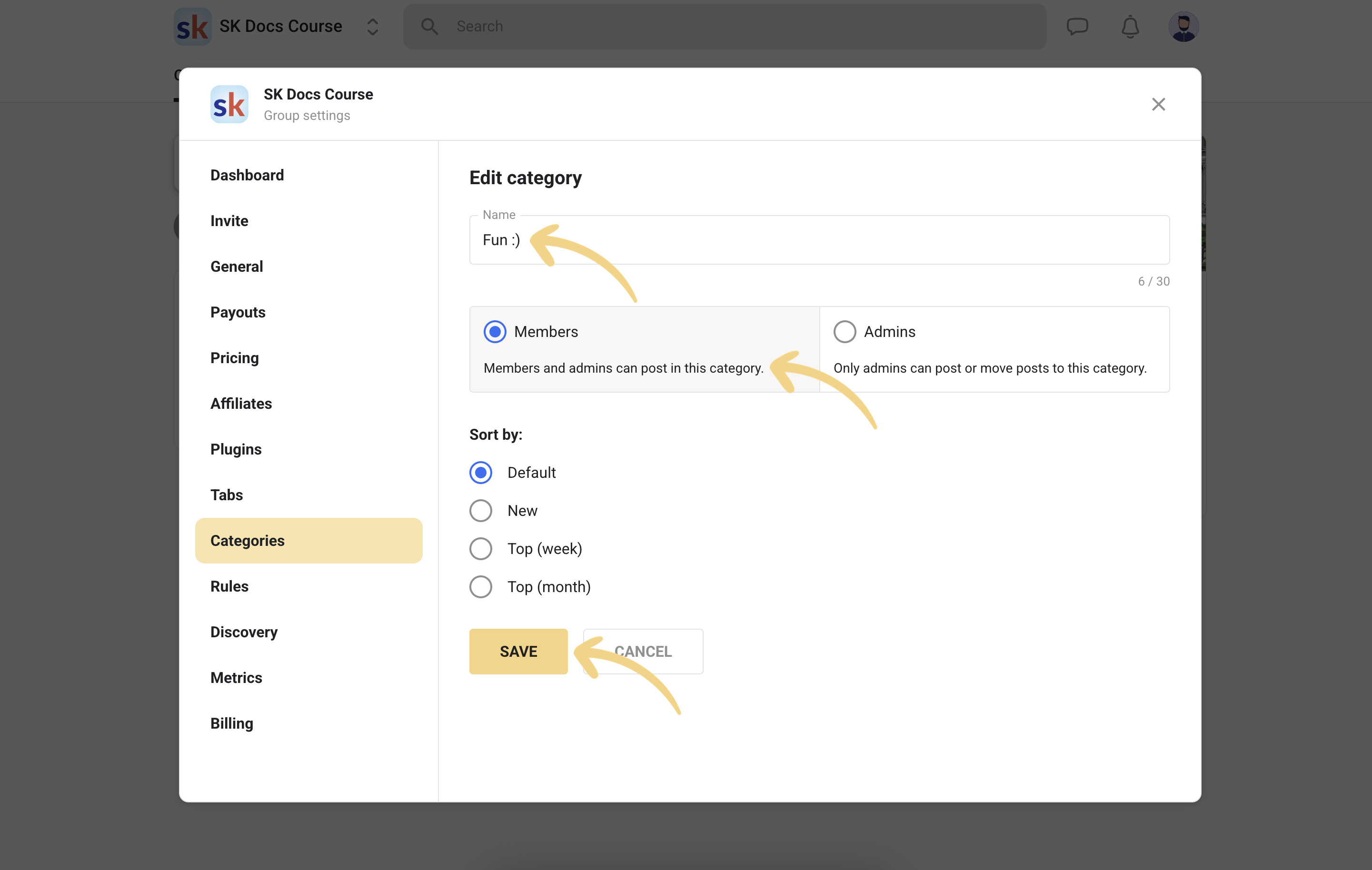
- Categories can be configured for member posting vs admin-only posting (great for announcements).
- You can tune spam controls with plugins (chat/posting unlock levels).

Plugins make moderation smarter (without heavy automation)
Instead of a complex “workflow builder,” Skool leans on plugins. This can be limiting for power users, but it makes the platform far easier to operate day‑to‑day — especially if you’re a solo creator.
QUALITY CONTROL
Membership Questions
Ask up to three join questions (including one email field) to filter and qualify new members.
ANTI-SPAM
Unlock chat / posting by level
Require a certain level before members can DM or post. Great for large groups; optional for small ones.
Membership Questions are especially useful if you want to treat your free group as a top‑of‑funnel asset and later convert the right people into paid tiers.


The biggest community limitation (still): structure
Skool is intentionally “one community = one main space.” Categories help, but the platform doesn’t feel like a multi-room building. If your business relies on splitting members into many parallel spaces (multiple cohorts, multiple client groups, multiple brands), you’ll feel friction sooner.
Many creators work around this by:
- Using categories like “channels” (Announcements, Wins, Q&A, Calls, Resources).
- Using tiers to control access to advanced courses and events.
- Keeping masterminds simple (one VIP tier) rather than building many separate spaces.

Events, Calls & Webinars
Great for: live community rhythmSkool’s calendar is one of the most underrated parts of the platform, because it creates rhythm. Communities stay healthy when there’s a predictable cadence: weekly Q&A, monthly workshops, and occasional “big moments.”
In 2026, Skool’s event toolkit is more complete than many people assume:
- Create events directly in the calendar (one-time or recurring).
- Use Skool Call for collaborative sessions or choose webinar mode (Pro).
- Optionally use external platforms like Zoom/Meet for certain sessions.
- Gate events by membership level, tier, or course access.


Event access control is genuinely useful
A practical advantage of having events inside your community platform: you can gate access cleanly. For example:
- Weekly call for all members.
- Advanced training for Level 3+ (reward engagement).
- VIP mastermind call for a specific tier.
- Workshop access only for people who purchased a course.


What’s still missing for “professional event operations”
- Advanced event funnels (multi-step registrations, upsells, custom email journeys) aren’t native.
- Detailed attendee management and automation typically requires external tooling or manual work.
- If events are your main product, you may want a dedicated event platform alongside Skool.
Monetization: Skool’s Biggest Upgrade
2026 highlight: more business modelsSkool used to push creators into a single primary model: “charge monthly for the group.” In 2026, Skool supports a wider range of monetization styles that actually match how creators sell.
The five group pricing models
Inside group settings, Skool lets you choose one of the main group “models”: Free, Subscription, Freemium, Tiers, or One‑time payment. Each one changes how people enter and upgrade.
FREEMIUM
Best for lead → paid upgrade
A free plan gets people inside your ecosystem, and the paid upgrade happens without sending them elsewhere.
TIERS
Best for Standard/Premium/VIP
Bundle benefits and access by tier — great for masterminds, coaching layers, or premium calls.
ONE‑TIME GROUP
Best for lifetime / pop‑up groups
Charge once for access — useful for cohorts, seminars, “30‑day challenges,” or lifetime libraries.
SUBSCRIPTION
Best for recurring community support
Simple monthly/annual memberships still work extremely well when the community is the product.


Selling inside the classroom: Buy‑Now courses
A smart addition: you can sell individual courses as one-time purchases (Buy Now). This helps if you want to keep the community free or low-cost while selling premium modules as upsells.
USE CASE
Free community → paid course
Attract members with discussions and mini-lessons, then sell a premium course to those who are ready.
USE CASE
Subscription → upsell bundle
Keep your core membership affordable, and offer one-off programs for deeper transformations.
This one feature alone removes a common “forced subscription” problem. You can now price your offers in a way that matches buyer psychology.

Skool Pricing & Transaction Fees (2026)
Most important section: fee mathSkool’s platform pricing looks simple — but the real cost depends on how you monetize. If you plan to grow revenue, you must understand how the transaction fees compound.
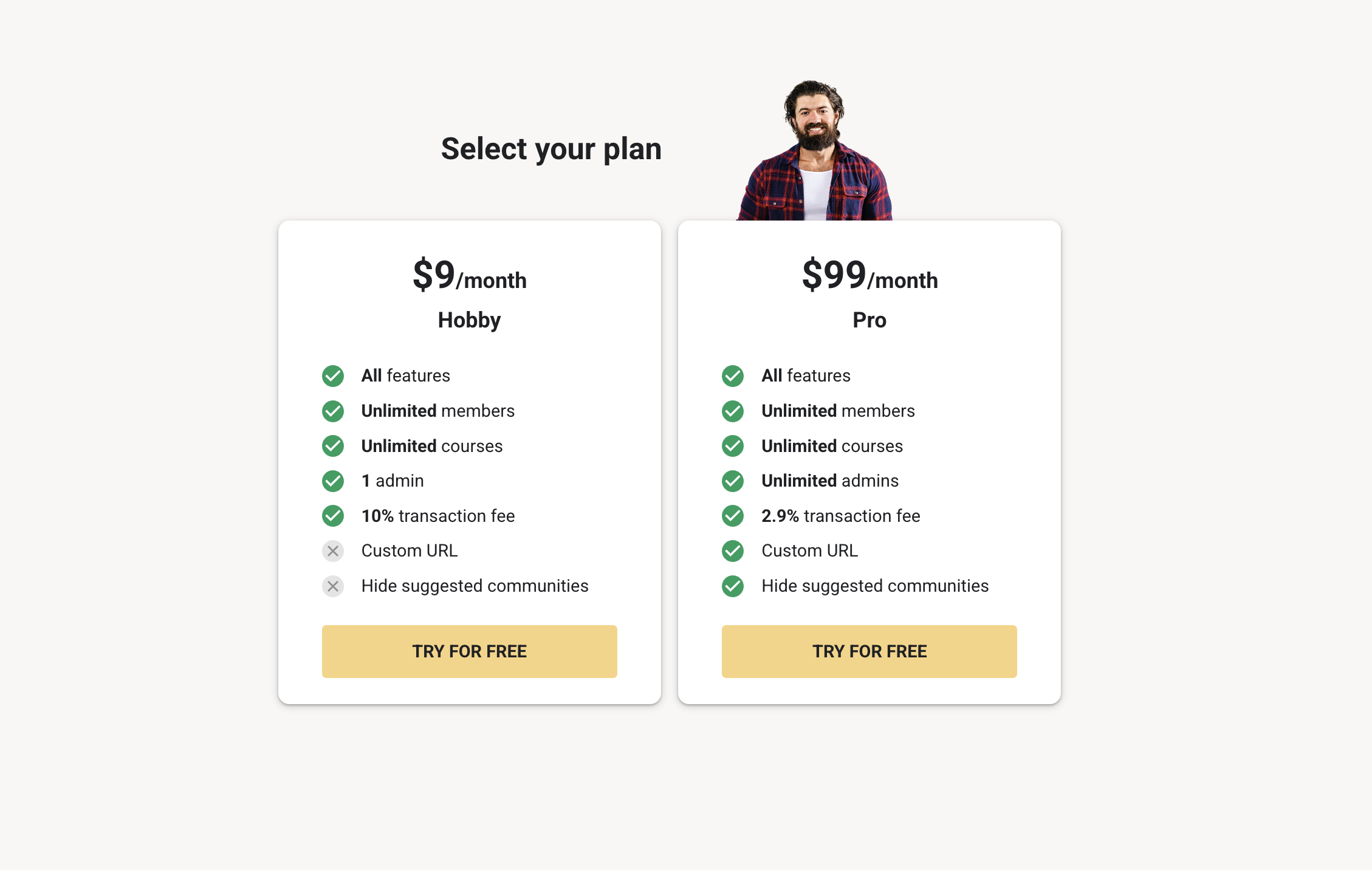
Two creator plans (platform subscription)
- Hobby: low monthly price, but higher transaction fees. Best for testing an idea.
- Pro: higher monthly price, lower transaction fees, and access to more “business” plugins.
Fee Calculator (Quick Estimate)
Tip: move the sliderThis calculator is a simplified planning tool. It helps you estimate how much you might pay in Skool fees. (It does not include every possible payment nuance, taxes, or chargebacks.)
Hobby: estimated fees
$0
Includes plan + transaction fees estimate.
Pro: estimated fees
$0
Includes plan + transaction fees estimate.
Difference
$0
Positive means Hobby costs more in this scenario.
Practical pricing scenarios (real creator math)
SCENARIO A
Testing a $29/mo offer
If you’re validating demand, Hobby can be fine — but watch the % fee. As soon as revenue becomes steady, the “cheap plan” can turn into the expensive plan.
SCENARIO B
Growing a $49–$99 membership
Pro often makes sense earlier than people expect, because fee savings compound. This is the most common Skool sweet spot.
SCENARIO C
Selling high-ticket programs
With high average ticket sizes, fees matter even more. Always run the numbers — and decide whether you want to process payments inside Skool.
Automation, Integrations & “Plugins”
Reality: helpful, not enterpriseSkool’s approach to automation is different from platforms that try to become a full marketing suite. Instead of a complex flow builder, Skool offers a set of plugins that solve common problems: onboarding, retention, tracking, approvals, and integrations.
What works well
- AutoDM helps you welcome new members automatically.
- Zapier lets you connect Skool to other tools (CRM, sheets, etc.).
- Tracking plugins (pixels/ads) are useful if you run paid traffic.
Where scaling businesses feel friction
- No “if this then that” workflow builder for complex member journeys.
- Limited conditional segmentation and behavior-based automation.
- Integrations are strong via Zapier, but native deep integrations are limited.


Branding, Customization & Perceived Value
Skool weakness: brand controlIf you care about brand experience (premium feel, white‑labeling, custom domain, full theming), Skool is still limited. The platform is designed so communities feel consistent and familiar — but that also means your community can feel like “just another Skool group.”
What you can customize
- Group name, icon/logo, cover image.
- Basic layout is consistent and fast.
- About page content becomes your landing + checkout page.
What you cannot fully control
- Full white‑label experience (your own branded app, removal of platform branding).
- Deep theme controls (fonts, full color system, layout modules).
- A true custom domain experience (your members stay on Skool URLs).
The upside: the uniform UI reduces user confusion. The downside: it reduces uniqueness.

Analytics & Business Visibility
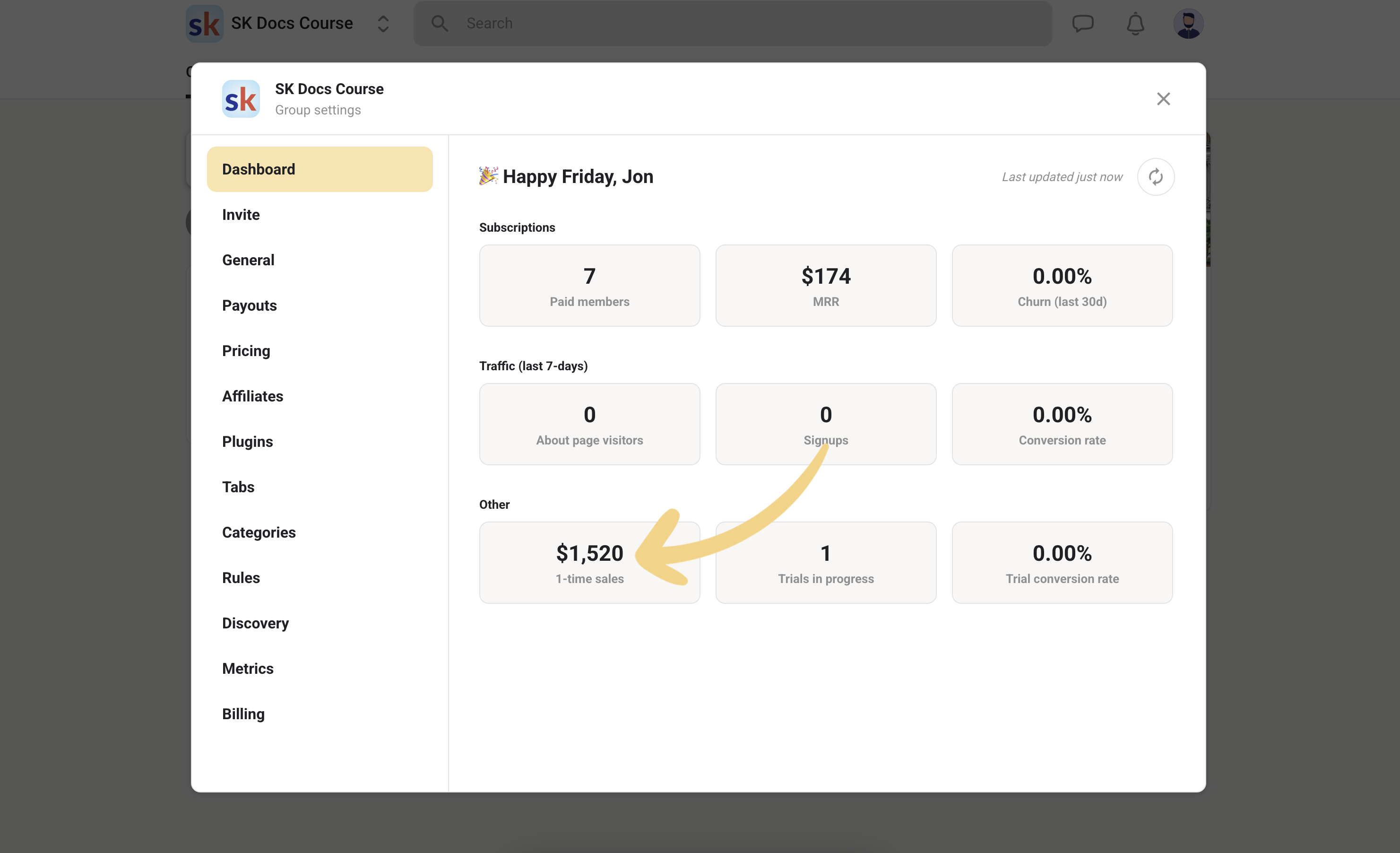
Good for: quick health checksSkool’s analytics are designed for operators who want a fast “health check,” not a data warehouse. You can see key numbers like member counts, MRR, churn, trials, and other metrics in a dashboard view.
For many creators, that’s exactly right: you want to know if growth is happening, if churn is rising, and whether trial conversions are healthy — without needing a complicated reporting setup.
Where you may need external reporting
- Deep cohort retention analysis (e.g., month‑3 vs month‑6 drop-off).
- Advanced segmentation and LTV breakdown by acquisition channel.
- Multi-product revenue reporting across different Skool groups.
Payments, Payouts & Member Experience
Note: operational details matterFrom the member’s perspective, Skool payments are straightforward: they join, pay, and get access. From the creator’s perspective, payouts and verification matter, especially if you’re running this as a real business.
Skool uses Stripe for payouts and identity verification (Stripe Express). This is standard and generally reliable — but it means your payout setup depends on Stripe’s requirements.
OPERATIONAL TIP
Set payouts early
Don’t wait until launch day to connect your payout method. Verification steps can take time.
OFFER TIP
Use annual where possible
Annual pricing can stabilize cash flow and reduce churn pressure compared to monthly-only offers.


Retention Tools (AutoDM, Onboarding, Cancellation Video)
Small features, big impactMost membership businesses don’t fail because the content is bad — they fail because people churn before they build habits. Skool’s retention features are “simple,” but they hit the highest-leverage moments: day 1 onboarding and the cancellation decision.
AutoDM: make new members feel seen
AutoDM lets you send an automatic direct message to new members when they join. The best AutoDM messages do two jobs: (1) direct the member to their first action, and (2) collect a tiny bit of context.
“Hey {{name}}, welcome! Quick question: what’s the #1 result you want from this group?
Also—start here: go to Classroom → ‘Start Here’ and do lesson 1 today.”
Cancellation video: reduce “easy churn”
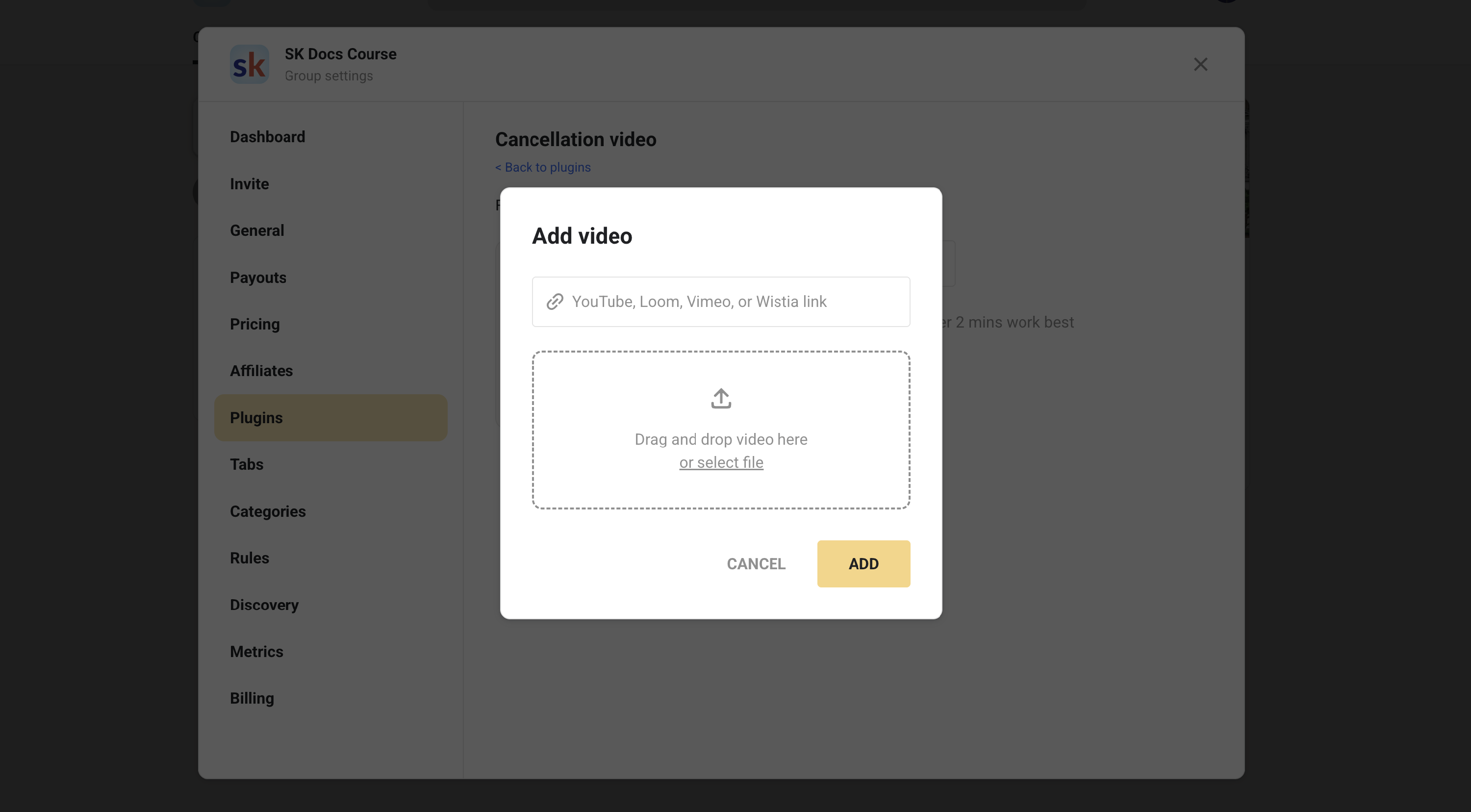
A cancellation video shows at the moment someone tries to leave. This is not about guilt-tripping — it’s about reminding members what they’ll lose, and what to do next to get value quickly.


Skool Setup Blueprint: Launch in 60 Minutes (Without Regret)
Copy‑paste checklistThe fastest way to “win” with Skool is to use its simplicity on purpose. Don’t build 30 courses. Build a strong onboarding flow, then iterate based on what members actually ask for.
STEP 1
Design your “Start Here” path
Create one short course (3–7 lessons) that moves people from “new” to “active” in a week.
STEP 2
Set pricing model intentionally
Subscription for recurring community, Freemium for lead → paid, Tiers for VIP layers, One-time for cohorts.
STEP 3
Lock in your weekly cadence
Create a recurring call. Consistency beats “big launches” for most memberships.
STEP 4
Turn on the right plugins
AutoDM + Membership Questions are usually the best starting combo. Add cancellation video once churn matters.
The exact launch checklist
- Create your group and choose your model (Free / Subscription / Freemium / Tiers / One-time).
- Write the About page like a sales page (promise, who it’s for, what’s inside, simple CTA).
- Build a “Start Here” course with 3–7 pages; include 1 action per lesson.
- Pin 2 posts: an “Introduce yourself” thread + a “How to use this group” quick guide.
- Schedule recurring events (weekly call + optional monthly workshop).
- Enable Membership Questions to filter and capture the right info.
- Enable AutoDM to push new members into lesson #1 immediately.
- Set a win condition: what should a member achieve in 7 days?
- Measure weekly: new members, active posts/comments, trial conversion, churn.
Skool Pros & Cons (2026)
Fast decision: do the trade-offs fit?PROS
What Skool does extremely well
- Fast to launch and easy for members to use.
- Community-first design that encourages activity.
- Strong monetization upgrades: freemium, tiers, one-time group pricing, buy-now courses.
- Course access gating (levels/time/private/buy-now) fits membership models.
- Calendar + calls/webinars create consistency and habit-building.
- Plugins cover high-leverage needs (AutoDM, cancellation video, tracking, integrations).
CONS
Where Skool still feels restrictive
- Limited branding/customization; hard to feel fully premium or unique.
- No built-in quizzes, assignments, or certificates (not a true LMS).
- Automation depth is limited; scaling ops often requires external tools.
- Community structure is intentionally simple; segmentation is limited.
- Transaction fees can become expensive as revenue grows.
FAQ (Collapsible)
Skool-style goldClick any question to expand. These answers are written for 2026 and focus on the stuff that affects real business decisions.
Q What is Skool, exactly?
Q Is there a free plan for creators?
Q How much does Skool cost in 2026?
Q Can I run freemium (free + paid) inside one Skool group?
Q Can I create multiple pricing tiers?
Q Can I charge a one-time fee for group access?
Q Can I sell a course without selling a subscription?
Q Does Skool have quizzes, assignments, or certificates?
Q How do course unlocks work?
Q Can I host webinars natively on Skool?
Q Is Skool good for live coaching communities?
Q Does Skool have a mobile app?
Q Can I collect emails when members request to join?
Q Can I reduce spam and bot accounts?
Q How does gamification work in Skool?
Q Can I rename the levels?
Q What is Skool Discovery?
Q Can I use a custom domain?
Q Can I remove “Powered by Skool” branding?
Q Does Skool integrate with Zapier?
Q Can I run ads and track conversions?
Q What payment processor does Skool use?
Q Can I issue refunds inside Skool?
Q Can I host more than one community?
Q Is Skool good for beginners?
Q Who should NOT use Skool?
Q What’s the fastest way to succeed on Skool?
Should You Choose Skool in 2026?
Decision guideChoose Skool if you want a community-first product that you can launch quickly — and you value simplicity over unlimited customization. Skool shines when your offer is built around interaction, accountability, and “learn together” momentum.
SKOOL IS A GREAT FIT IF…
- You’re building a paid community or membership.
- You want courses + community + events in one place.
- You’ll use freemium/tiers/upsells to grow revenue.
- You prefer tools that are simple to operate.
BE CAREFUL IF…
- You need quizzes/certificates and deep learning paths.
- You need full white-label branding and custom domains.
- You rely on advanced automation workflows.
- Transaction fees would materially damage margins.