
 PhoneBurner Review 2025
PhoneBurner Review 2025: Details, Pricing, & Features
A hands-on look at how PhoneBurner’s delay-free power dialer helps teams increase cold call conversions with one-click follow-ups, strong coaching tools, and caller-ID reputation safeguards.
Last updated: 7 November 2025
Executive Summary
What it is: a single-line power dialer with one-click post-call automation (voicemail, email/SMS, tasks/tags) and built-in coachability (listen/whisper/barge + recordings).
Who it’s for: outbound SDR/BDR and AE teams focused on the US/Canada where call quality and connect rates matter more than predictive multi-line volume.
Why it stands out: reputation tooling (Local Presence, ARMOR® remediation), simple workflows, and data that managers can coach.
1) What PhoneBurner is & who it’s for
PhoneBurner is a cloud power dialer optimized for delay-free connections. Reps run list-based sessions and trigger follow-ups from a single disposition panel. Managers listen/whisper/barge, review recordings, and coach with scorecards.
Best fit
- Outbound teams targeting the US/Canada
- Leaders who value call quality + number reputation
- Teams that want a quick rollout and coachable workflows
Less ideal
- Operations that require predictive or multi-line dialing
- Global orgs needing EU/UK data residency
- Inbound-heavy contact centers with complex IVR/queueing

2) Plans & pricing (2025)
| Plan | Month-to-month | Annual (per user/mo) | Recording | Softphone | Inbound | SMS | Coaching |
|---|---|---|---|---|---|---|---|
| Standard | $165 | $140 | 30 days | — | — | — | — |
| Professional | $195 | — | 90 days | Yes | — | — | Yes |
| Premium | $215 | — | Unlimited | Yes | Yes | Yes (segments incl.) | Yes |
- Free trial: minutes-limited; no credit card required.
- Local Presence: requires a verified number pool.
- SMS (Premium): A2P 10DLC registration required; outbound segment allowance + billed overages.

3) Hands-on: calling experience
Delay-free dialing: calls connect instantly—no awkward pause. With good lists and talk tracks, reps typically attempt more dials/hour while keeping conversations natural.
- Dial modes: Power (single-line) + Preview/Pause for context-heavy records.
- Local Presence: match area codes using your number pool to nudge answer rates.
- Softphone or dial-through: in-browser softphone (higher tiers) or desk/mobile phone.
- Voicemail drops: record once; drop with one click.


4) Automation & follow-ups (email/SMS)
Disposition automation: on call outcome, trigger emails/SMS, tasks, next steps, tags, and CRM logging—all at once. SmartSender tracks opens/clicks so engaged contacts feed dynamic lists for immediate call-backs.
5) Caller ID, deliverability & compliance
- Caller ID options: bring your numbers (verify) or purchase and group into Number Pools.
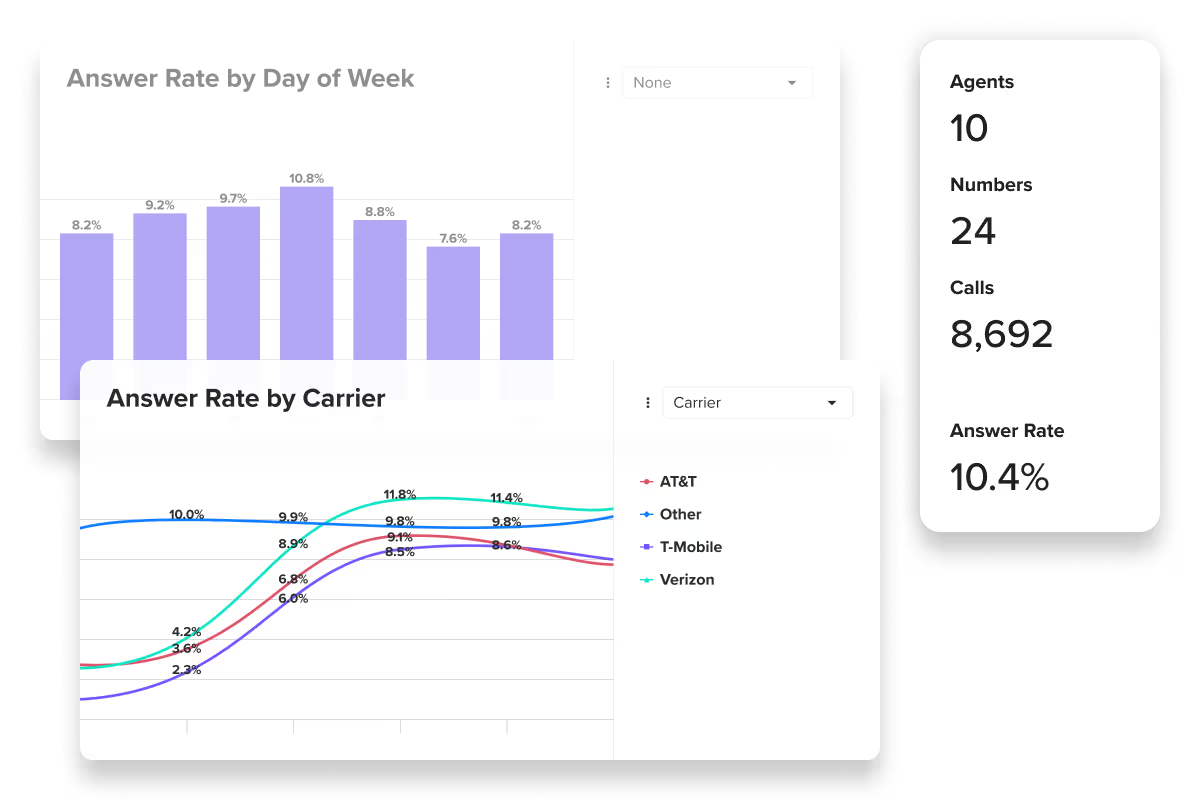
- ARMOR® reputation (add-on): monitor answer rates/labels, register numbers, and remediate false “spam likely.”
- CNAM assistance: register a display name where supported.
- Branded Caller ID: not offered; rely on CNAM + healthy dialing patterns.
- DNC/TCPA: internal DNC, consent capture, and safe calling windows.
- SMS compliance: complete A2P 10DLC registration before production sending.

6) Integrations & extensibility
Native connectors for Salesforce, HubSpot, and Nimble, plus Zapier and a public REST API for custom flows.


7) Reporting, coaching & QA
Live monitoring (listen/whisper/barge), leaderboards & scorecards (dials, connects, talk time, conversion, next steps), and a recording library (plan-based retention) for training.
8) Security, data handling & geography
- Security: enterprise-grade controls; SOC 2 Type II posture.
- Geography: designed for US/Canada. Don’t store EU/UK personal data in PhoneBurner.
- Data hygiene: sync only fields you need for calling; keep regulated data in systems with proper residency.

9) Setup guide (15-minute start + week-one plan)
Quick start (≈15 min)
- Create workspace → invite users
- Verify numbers → small number pool → enable Local Presence
- Connect CRM or set up Zapier/API
- Record 2–3 voicemails → build disposition rules
- Import your first list → map fields → run a 10-contact test
- Enable recordings & monitoring → set retention/QA policy
Week-one rollout
- Day 1–2: two 30-min call blocks; A/B two openers
- Day 3–4: Local Presence live; SmartSender list for hot opens/clicks
- Day 5: QA hour: review 8–10 calls; create coaching cards
- Day 6–7: add a second number pool; set alerts for answer-rate dips
10) Troubleshooting & best practices
Low answer rate
- Tighten targeting; avoid “spray and pray” Local Presence
- Keep attempts per number sensible; expand pools gradually
- Refresh lead sources; prune aged/recycled records
Spam-label spikes
- Pause affected numbers; open remediation via ARMOR®
- Rotate dialing patterns; vary dayparts
Audio quality
- Prefer wired headsets; close bandwidth-heavy apps
- Test softphone vs dial-through; verify network stability
Compliance guardrails
- Maintain an internal DNC; scrub on import
- Store explicit consent in your CRM; respect quiet hours
11) Pros & cons
Pros
- Delay-free connects; natural conversations
- One-click post-call automation (voicemail, email/SMS, tasks/tags)
- Strong coaching (listen/whisper/barge) + practical reporting
- ARMOR® reputation tooling + CNAM assistance
- Smooth onboarding; intuitive UI
Cons
- Premium pricing vs SMB-focused dialers
- Inbound & SMS are Premium-only
- Primarily US/Canada; limited global data residency
- No predictive/multi-line (by design)
12) ROI model (template)
- Reps: 4
- Dials/rep/day: 100 → 250–300
- Connect rate: 8%
- Close on live conv: 5%
- Avg. deal value: $500
Baseline: 100 × 8% = 8 live conv/day/rep → 8 × 5% = 0.4 deals/day/rep
With PhoneBurner (~3× dials): 270 × 8% = 21.6 live conv/day/rep → 21.6 × 5% = 1.08 deals/day/rep
Lift: ≈ +0.68 deals/day/rep → ~3.4 extra deals/week/rep → $1,700/week/rep → $6,800/week (4 reps)
Cost: from $165/user/mo × 4 = $660/mo → Payback: ~$660 / $1,700 ≈ 0.39 weeks (~2–3 days)
13) Alternatives to consider
- Predictive/multi-line dialers if you need maximum attempts/minute in call-center models
- All-in-one CCaaS if inbound queues, IVR, and omnichannel routing dominate
- Sales engagement platforms if calling is secondary to email/social
14) Verdict
If your motion is outbound-heavy in the US/Canada and you want answer-rate-first dialing with excellent post-call automation and coachability, PhoneBurner is a standout. It’s a premium tool, but the blend of delay-free connects, reputation safeguards, and manager tooling typically pays for itself once reps spend more time in live conversations.
15) FAQ
Does PhoneBurner support predictive or multi-line dialing?
No—by design it’s single-line to keep calls natural and protect answer rates.
Can I bring my own numbers and use Local Presence?
Yes. Verify ownership, build a pool, and enable local area-code matching.
Does it integrate with Salesforce/HubSpot/Nimble?
Yes—plus Zapier for workflow automation and a public REST API for custom flows.
Is SMS included?
On Premium, after A2P 10DLC approval. Monthly outbound segments are included; overages billed in 1,000-segment blocks.
What about inbound calls?
Inbound is a Premium feature; Standard/Professional are primarily outbound.
Can I store EU/UK personal data in PhoneBurner?
No. Keep EU/UK personal data in platforms with the appropriate residency.
16) Legal & policy notes
- Follow TCPA/DNC rules; document consent; scrub lists on import.
- For SMS, complete A2P registration before production sending.
- Set call-recording retention to match your compliance policy.