
Recruit CRM Review (2025): A Complete A–Z Guide for Agencies & Executive Search
If you run a recruitment agency or executive search firm and you want a clean, AI‑powered platform that fuses an ATS with a true CRM, Recruit CRM is one of the strongest all‑round choices right now. Below, you’ll find everything from founders and philosophy to features, pricing, onboarding, security, and real‑world results—so you can decide with confidence.
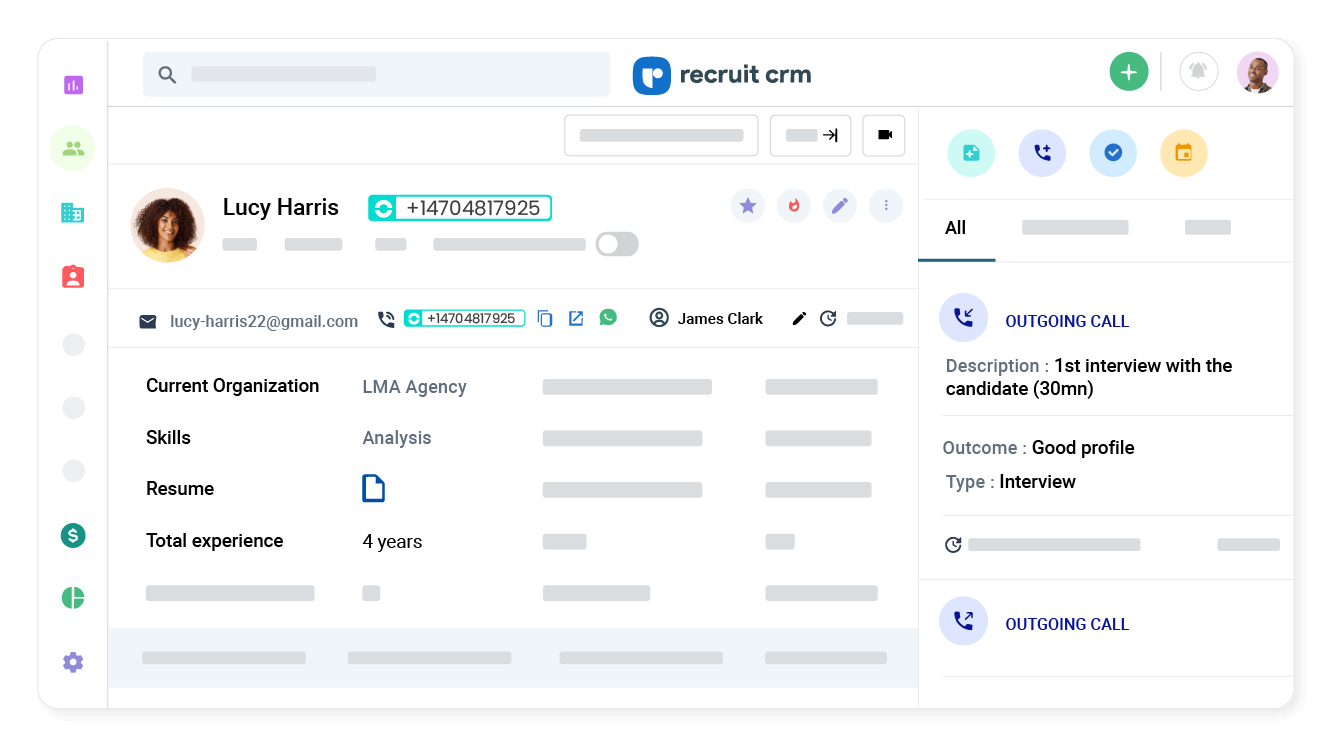
What is Recruit CRM?
Recruit CRM is an AI‑powered applicant tracking system (ATS) combined with a full customer relationship management (CRM) suite, purpose‑built for recruiting and executive search teams. It centralizes candidate sourcing, resume parsing, two‑way email sync, job posting, analytics, and workflow automation in one place. The product is used in 100+ countries and is positioned squarely at agencies and search firms that need speed, collaboration, and reporting without unnecessary complexity.
Founders & Vision
Recruit CRM was founded by Shoanak (Sean) Mallapurkar, now CEO, with Ajay Mallapurkar as Co‑founder & Chairman. The company highlights that it’s bootstrapped, profitable each quarter, and operates with a global team to serve 1,500+ recruitment and staffing businesses across 100+ countries. The brand’s stated mission: to help recruitment businesses win with easy‑to‑use, cutting‑edge technology and true customer obsession.
Culture‑wise, the company leans into transparency, integrity, and rapid iteration—a mindset that shows in frequent feature updates (AI capabilities, workflow automation, advanced analytics, and integrations) and in the responsiveness of their support team.
Who is Recruit CRM best for?
- Recruitment agencies & search firms needing an all‑in‑one ATS + CRM that is flexible, customizable, and quick to train on.
- Exec search teams that need clean pipelines, research-friendly notes, and executive search reporting for clients.
- Scaling agencies that want automation (emails, tasks, LinkedIn messages), AI parsing & matching, multiposting, and robust dashboards.
- Mobile recruiters who benefit from iOS/Android apps and a Chrome sourcing extension to capture candidates from anywhere.
If you’re consolidating tools (ATS, CRM, email, job posting, analytics) to reduce cost and context switching, Recruit CRM hits a sweet spot.
Why choose Recruit CRM over other options?
Three big reasons: usability, automation, and add‑on depth. The UI is genuinely clean; the core feature set (ATS + CRM + email + parsing + pipelines) is strong out of the box; and the add‑on catalog—like LinkedIn Messages Integration, Advanced Analytics, Workflow Automation, Job Multiposting/Direct Apply, Data Enrichment, and Recruit Craft (career sites & candidate portal)—lets you scale capabilities as your agency matures.
- Automation first: automated sequences for email/LinkedIn/SMS, workflow bots, data enrichment, and match suggestions reduce manual effort.
- Analytics that leaders trust: dashboards & executive search reporting help quantify ROI, performance, and bottlenecks.
- Real support: 24/7 live chat and fast response makes adoption smoother for teams of all sizes.
Core Features (Daily Use)
ATS + CRM in one place
Manage jobs, candidates, clients, and deals with Kanban pipelines, custom fields, two‑way email/calendar sync, and candidate/client activity timelines. Recruiters can easily push candidates to clients, capture structured feedback, and keep conversations in a single system of record.
Chrome Sourcing Extension
A browser extension lets you capture candidates (and contacts/companies) from sites like LinkedIn or Xing with one click—complete with duplicate detection and field customization—so researchers can move fast without polluting the database.
AI Resume Parsing & Matching
Bulk‑parse PDFs/Word files and convert resumes into structured profiles. AI‑powered matching and search help surface shortlists more quickly, while candidate summaries and JD generation reduce admin time.
Two‑way email & sequences
Sync popular mailboxes (Google, Microsoft 365, Zoho, IMAP) so recruiter email lives where work happens. Automated sequences handle polite follow‑ups, reminders, and nurtures across email, LinkedIn, and SMS.
Reporting you’ll actually open
Out of the box you get useful reports; add Advanced Analytics and executive‑style dashboards (e.g., time‑to‑hire, candidate lifecycle, deals, team activity, client performance) with alerts and role‑based access controls.
Mobile apps (iOS & Android)
Check notes, email candidates, move pipelines, and review resumes on the go. The mobile apps make Recruit CRM viable for consultants who live in their phones.
AI & Automation: Where Recruit CRM Really Shines
- AI resume parsing (including bulk parse) to structure candidate data fast.
- AI matching (job→candidate and candidate→candidate) to shortlist faster.
- GPT‑powered helpers to generate JD drafts, candidate summaries, email templates, and call transcripts.
- Automated sequences for email/LinkedIn/SMS to improve response rates and show up for candidates/clients consistently.
- Workflow Automation (add‑on) to integrate with 1,000+ apps, trigger actions on status changes, send alerts, and more.
If you want to buy back recruiter time, this combination of AI + sequences + workflows is where you feel the compounding gains.
Add‑ons & Integrations
LinkedIn Messages Integration
Send and receive LinkedIn messages directly inside Recruit CRM so conversations stay attached to people and jobs. The integration is powered by Unipile and is included in the Enterprise plan; on other plans it’s available as an add‑on.
Job Multiposting & Direct Apply
Publish roles to thousands of job boards, track campaign performance, integrate your existing contracts, and use Direct Apply so candidate data arrives straight into your ATS.
Advanced Analytics
Create tailored dashboards, schedule alerts, and share reports. Great for weekly stand‑ups, client status calls, and leadership reviews.
Workflow Automation
No‑code automation that can connect to 1,000+ systems (and thousands more via Zapier, Integrately, or Pabbly). Enterprise includes managed setup and a monthly task allowance.
Data Enrichment
Fill missing candidate phone/email (and contact work emails) directly from within a profile, so outreach can start immediately.
Recruit Craft (Career Pages & Candidate Portal)
Spin up branded, SEO‑friendly career pages and a candidate portal that syncs in real time with your Recruit CRM jobs and applications—no code needed.
Integrations
Zapier offers plug‑and‑play flows to tools like HubSpot, Gmail, Sheets, Slack, LinkedIn, Apollo, Mailchimp, Typeform, and more. The native API gives you deeper control when you need it.
Pricing & Plans (How it’s Structured)
Recruit CRM’s pricing is transparent and designed for agencies that may grow into advanced capabilities over time. There are three main plans billed per user/month (with an annual option that typically saves up to ~20%):
- Pro — The essential tech stack to get started (Chrome sourcing, AI parsing, integrated mailbox, pipelines, job posting, unlimited open jobs, reporting basics, etc.).
- Business — Everything in Pro plus automated email sequencing, bulk texting, executive search report generator, resume formatting, custom roles & teams, multiple hiring pipelines, IP whitelisting, audit logs, SSO, and the ability to connect two email accounts per user.
- Enterprise — Everything in Business plus all major add‑ons included in a single price: Workflow Automation (with tasks included), Advanced Analytics (with expert setup), LinkedIn Messages Integration, Data Enrichment credits (per user), calling/texting credits (~10% of your Recruit CRM spend, region‑dependent), Recruit Craft career pages, and job multiposting & direct apply support.
Good to know:
- Unlimited free trial with usage limits—no credit card required.
- Certain features (calling/texting) require separate credits; per‑minute/text pricing varies by country.
- Multi‑language interface (English, Dutch, French, Portuguese, Spanish, German, Japanese, Italian, Simplified Chinese) is available from the site header.
Onboarding, Training & Data Migration
Teams typically get productive fast thanks to the minimal learning curve, clean UI, and 24/7 live chat. The vendor provides a help center, videos, and hands‑on support. Agencies migrating from legacy ATS/CRMs can lean on Recruit CRM’s data migration service, which follows a clear process (discovery → secure import → deployment/review). In practice, most migrations complete quickly and accurately, including large CSV/XLS exports and even database‑level transfers from older systems.
If you’re switching systems: clarify field mapping, custom objects, and reporting outcomes early. Recruit CRM’s team and API make custom mapping straightforward—and Advanced Analytics can replicate (or improve) your reporting.
Security, Privacy & Compliance
- Hosting & standards: infrastructure on AWS with ISO 27001 and SOC 2 accredited physical infrastructure.
- Encryption: TLS/SSL for data in transit; AES for sensitive data at rest; passwords hashed.
- Access controls: RBAC, multi‑step authentication for production access, third‑party VAPT, vulnerability scanning & patching, and routine security training.
- GDPR: The company positions itself as a GDPR‑compliant processor and provides documentation and DPA terms.
From a recruiter’s perspective, the above checks the right boxes for client trust, candidate protection, and enterprise IT due diligence.
Support & Customer Success
Support is a standout. Recruit CRM promotes 24/7 live chat across global time zones with very fast first responses (often under a minute). Beyond chat, you get a searchable help center, tutorial videos, and optional guided setups for add‑ons like Advanced Analytics or Workflow Automation.
For leaders: making dashboards visible and getting weekly alerts is often the quickest win. The team will help you wire this up so everyone sees the same truth.
What Real Users Say (Third‑party Reviews)
On major review platforms, Recruit CRM consistently scores high for ease of use, customer service, and the pace of continuous improvement. Users call out the “clean UI,” “quick onboarding,” and “responsive support” as top reasons they switched—and stayed.
- Reviewers highlight the LinkedIn plugin and automations as practical time‑savers.
- Agencies appreciate migration help and how dashboards reduce status‑update friction with clients.
- Constructive feedback includes: translations in certain languages needing polish; occasional slowness at peak times (usually transient); and that some advanced capabilities are reserved for add‑ons or higher tiers.
Real‑world Results
Case studies and customer stories report gains like faster time‑to‑submit, clearer client reporting, and increased candidate flow when pairing Recruit Craft career pages with multiposting. A common theme: recruiters spend less time on admin and more time on conversations that convert to placements.
Pros & Cons
What we like
- All‑in‑one approach—genuine ATS + CRM with two‑way email, parsing, and pipelines.
- Automation & AI—sequences, GPT helpers, matching, and a powerful workflow engine.
- Reporting that scales—executive search reporting and optional Advanced Analytics with expert setup.
- LinkedIn messages inside the ATS—keep convos in context; no tab‑juggling.
- Global support—24/7 live chat with fast response times.
- Mobile apps—iOS/Android plus a robust Chrome extension for sourcing.
- Unlimited free trial—evaluate properly before you commit.
Trade‑offs to consider
- Add‑on economics—to unlock full power (automation, analytics, LinkedIn messages, multiposting) you’ll either choose Enterprise or add items à la carte.
- Telephony credits—calling/texting usage is metered; rates vary by country and can add up for heavy phone teams.
- Language polish—non‑English locales are supported; some translations may feel less idiomatic in places.
- Pricing visibility—numeric plan prices can vary by currency/region and are not always front‑and‑center on the page.
Final Verdict
If you’re an agency or executive search firm that wants a modern, scalable platform with built‑in automation and room to grow, Recruit CRM is an easy recommendation. The day‑to‑day recruiter experience is smooth; leadership gets the analytics they care about; and with the right add‑ons (or the Enterprise bundle), you can run outreach, multi‑posting, and reporting at a level that usually requires multiple tools.
Competitively, it stacks up well against older, heavier systems on usability and speed while matching them on integrations and extensibility. The unlimited free trial and 24/7 chat make it low‑risk to evaluate. If you value “one login to do it all,” this should be on your shortlist.